

? | Home page | Tutorial | Recording

I prefer to record them last but there are no rules. If you prefer to record them first, then do so.
To record vocals, make sure the place is quiet, shut the door, tell the people who live with you to be quiet, and do not record while your neighbor is drilling holes through his kitchen walls! Also, turn off your monitors and use a headset instead to avoid recording the playback with your microphone.
Condenser or dynamic microphones?
Dynamic microphones are solid, they don' need a power source, they can take heavy acoustic pressure (like a kick drum or a saxophone) and they are not too expensive. They are also less sensitive to surrounding noises than condenser microphones. The cons are they lack clarity in the high range, which renders takes less clear and defined than with condenser microphones. They can be used with Jack or XLR plugs.
Condenser microphones are much more responsive and accurate. Their high sensitivity is double-edged, because they will capture any noise when recording. The fans of your PC are noisy? Chances are this noise will be recorded. Sound comes out of your headset? It will be recorded by your condenser microphone. Children are loudly playing outside? You might get that too. However, some condenser microphones are called "cardioid", or "hyper cardioid", and they only record what comes from a specific direction, ignoring (more or less) other sound sources from other directions. On the contrary, omnidirectional microphones record what comes from anywhere. Not ideal for a home studio. Condenser microphones are also more fragile (don't knock them) and must be powered through a "phantom power", whose standard is 48 volts. This kind of power is either present on your audio interface and can be turned on and off with a button, or it will require the use of an external phantom power source that you will then connect to your audio interface. You have to use 3-pin XLR plugs that carry the phantom power current. Finally, condenser microphones are usually rather expensive, some of them cost several thousand euros (or dollars, or pounds), but only professional studios or rich amateurs can afford those. On the plus side, the sound you get with a condenser microphone will have the best quality.
Be cautious though, a good dynamic microphone is worth better than a bad condenser microphone. No big secret here, for microphones like for anything else, very low prices are rarely synonymous with good quality.
A few known and renowned microphone brands: AKG, Milab, Neumann, Rode, Sennheiser, Shure...
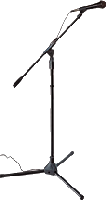
Some pieces of advice: buy a microphone stand and a pop filter (you can also make one yourself with wire and a piece of tights from your wife / girlfriend / mother / daughter / neighbor). The stand will prevent you from manually holding your microphone and thus produce handling noises. As for the pop filter, it prevents the air to hit the microphone and produce unwanted blowing sounds when you pronounce some letters such as "p" or "b".
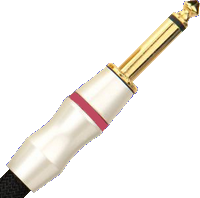
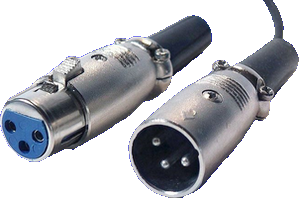
Jack plug (left) and XLR (right)


No need to go on and on forever, recording is rather easy. As long as you pay attention to your recording levels and take care over your takes, you should get a satisfying result, good enough to finalize the song
Messages page # 1 2 3 4 5 6 7 8 9 10 11 12 13 14 15 16 17 18 19 20 21 22 23 24 25 26 27 28 29 30 31 32 33 34 35

Siko
le 11/04/2018 à 10h39
Bravo Xavier, juste un petit mot de soutien, je suis impressionné par ton site et tes compos, très motivant pour un "jeune" débutant comme moi, je ne manquerais pas de revenir pour en écouter plus et profiter de ton expérience.
Bonne continuation et merci.
* * * * * * * * * * * * * * * *
Merci à toi, ça fait plaisir !
Grebz
Nicklaus
le 03/03/2018 à 14h10
Salut,
Je viens de prendre connaissance de ton site, c'est pas mal du tout, je voulais me mettre aux IR depuis un bout de temps, et là j'aurais quelques questions.
J'ai énormément de matériel de musique et j'aimerais tout centraliser dans un Helix.
Pour ça il faudrait que je puisse séparer chaque élément de mon rack et de mes pédales de manière indépendante, est-ce possible?
J'imagine que oui, il suffit simplement d'avoir une différence entre l'entrée et la sortie des appareils, comme les tutos que tu proposes.
Par contre j'aimerais pouvoir faire une IR de mon ampli de puissance et là je bloque un peu.
En effet, si je veux sortir le son de mon ampli de puissance il faut obligatoirement que je passe par un baffle et là ça va colorer mon son. Existe-t-il un moyen de récupérer juste un fichier IR de mon ampli de puissance un Mesa Boogie fifty-fifty.
Et pouvoir aussi récupérer un IR de mon baffle seul.
En fait ce que vous je voudrais faire dans le Helix c'est pouvoir charger plusieurs IR de chaque élément de mon rack, un pour le preamp, un pour l'ampli de puissance, un pour le baffle...
Si tu as des idées pour faire quelque chose, je serais ravi d'avoir tes conseils, merci d'avance
Mouss Kerr
le 31/01/2018 à 19h08
Bonjour,
Félicitations pour ton site. J'essaie de télécharger les simulateurs d'amplis gratuits sans succès. Je m'y prends certainement mal car je débute. Mon matériel : PC I5 64 bits. DAW Reason 9.5. J'ai créé un dossier VST ajouté dans préférences ... Avancé. J'y ai transféré le fichier DLL mais impossible de l'ouvrir sous Reason. Merci par avance
uni
le 13/01/2018 à 19h29
Solid work across the board. Found myself here because of your amp heads and then never left!
* * * * * * * * * * * * * * * *
<em>Glad you find the place nice and cosy. You're welcome here!
Grebz</em>
Ym_trainz
le 11/11/2017 à 00h35
Merci pour ce tuto !
Le seul bémol que j'apporterais, c'est la dynamique finale : ne pas céder au chantage mais rester à -14 / -12dB RMS si on exporte sur CD. En revanche, -12 / -11 dB pour un mp3 192kbps paraît acceptable.
Ym_trainz
* * * * * * * * * * * * * * * *
<em>Oui, dans la mesure du possible, je confirme que c'est bien de rester à des niveaux inférieurs à -12dB. Il faut tendre vers ça le plus possible. Mais en arrivant à -10dB dans mon exemple, je fais malgré tout déjà mieux que la plupart des albums actuels.
Quant à l'export CD, il est quand même de plus en plus rare. La plupart des gens écoutent désormais leur musique depuis leur téléphone portable, et bien souvent en mp3. Et honnêtement, la différence entre un fichier wav et un fichier mp3 à 320 kbps est indiscernable pour 99 % des gens. Même à 192 kbps, rares sont ceux qui sont capables d'entendre la différence, surtout quand c'est écouté au travers d'écouteurs ou d'enceintes bas de gamme ou moyenne gamme.
Grebz</em>