

? | Home page | Tutorial | Recording

I prefer to record them last but there are no rules. If you prefer to record them first, then do so.
To record vocals, make sure the place is quiet, shut the door, tell the people who live with you to be quiet, and do not record while your neighbor is drilling holes through his kitchen walls! Also, turn off your monitors and use a headset instead to avoid recording the playback with your microphone.
Condenser or dynamic microphones?
Dynamic microphones are solid, they don' need a power source, they can take heavy acoustic pressure (like a kick drum or a saxophone) and they are not too expensive. They are also less sensitive to surrounding noises than condenser microphones. The cons are they lack clarity in the high range, which renders takes less clear and defined than with condenser microphones. They can be used with Jack or XLR plugs.
Condenser microphones are much more responsive and accurate. Their high sensitivity is double-edged, because they will capture any noise when recording. The fans of your PC are noisy? Chances are this noise will be recorded. Sound comes out of your headset? It will be recorded by your condenser microphone. Children are loudly playing outside? You might get that too. However, some condenser microphones are called "cardioid", or "hyper cardioid", and they only record what comes from a specific direction, ignoring (more or less) other sound sources from other directions. On the contrary, omnidirectional microphones record what comes from anywhere. Not ideal for a home studio. Condenser microphones are also more fragile (don't knock them) and must be powered through a "phantom power", whose standard is 48 volts. This kind of power is either present on your audio interface and can be turned on and off with a button, or it will require the use of an external phantom power source that you will then connect to your audio interface. You have to use 3-pin XLR plugs that carry the phantom power current. Finally, condenser microphones are usually rather expensive, some of them cost several thousand euros (or dollars, or pounds), but only professional studios or rich amateurs can afford those. On the plus side, the sound you get with a condenser microphone will have the best quality.
Be cautious though, a good dynamic microphone is worth better than a bad condenser microphone. No big secret here, for microphones like for anything else, very low prices are rarely synonymous with good quality.
A few known and renowned microphone brands: AKG, Milab, Neumann, Rode, Sennheiser, Shure...
Some pieces of advice: buy a microphone stand and a pop filter (you can also make one yourself with wire and a piece of tights from your wife / girlfriend / mother / daughter / neighbor). The stand will prevent you from manually holding your microphone and thus produce handling noises. As for the pop filter, it prevents the air to hit the microphone and produce unwanted blowing sounds when you pronounce some letters such as "p" or "b".
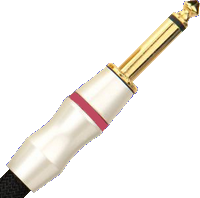
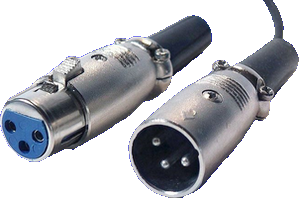
Jack plug (left) and XLR (right)
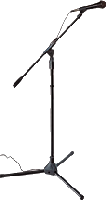
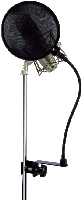

No need to go on and on forever, recording is rather easy. As long as you pay attention to your recording levels and take care over your takes, you should get a satisfying result, good enough to finalize the song
Messages page # 1 2 3 4 5 6 7 8 9 10 11 12 13 14 15 16 17 18 19 20 21 22 23 24 25 26 27 28 29 30 31 32 33 34 35

Nico
le 16/03/2020 à 01h12
Bonjour,
J'ai essayé de me créer des IR avec Voxengo Deconvolver mais je n'obtiens que des fichiers de 1K qui sont vides.
Avez-vous une idée du problème ?
Merci par avance.
Peekup
le 22/02/2020 à 08h47
Bonjour, j'ai testé récemment une simu d'ampli. Il me semble qu'on pouvait changer le skin des amplis (skaï revêtement, boutons contrôle).sauriez vous me dire le nom de cette simu ?
merci d'avance et félicitations pour le site, une vraie mine d'or.
Thierry
billynilly
le 18/01/2020 à 18h08
Whatever happened to the Cranked AC plugin? I've been looking all over for it but can't find it anywhere.
* * * * * * * * * * * * * * * *
Sorry, I never heard of this plugin. If it's an old plugin, chances are it's also a 32-bit plugin, which may not work properly on modern systems, but anyway I couldn't find it either.
Grebz
Kovrm
le 12/01/2020 à 23h06
So the chain goes:
DAW > Audio Interface Out > Amp > Speaker > Mic > DAW
This is correct based on my understanding from what I've read, and the few videos I've watch on creating IRs. My question, then, is when I plug into the Amp I've seen people say plug your Interface out into the FX return, but you say the guitar cable jack. What is the purpose in doing one or the other?
Side questions:
What channel should my amp be on? I'm assuming the clean channel.
What should my Amp settings be (EQ, Gain, Channel Volume, Presence, Master Volume)? I can't find a clear answer anywhere.
* * * * * * * * * * * * * * * *
Hello,
About plugging into the FX return or the guitar jack, I don’t know. Actually, the amps I’ve used myself to make IRs don’t have any FX return, so I didn’t have a choice and had to plug into the guitar jack. I guess there’s no harm trying both (not at the same time!) and comparing if you have that possibility. Chances are there’s not much of a difference, but again, I may be wrong as I have not tried this myself.
About the choice of a channel, and the settings: the channel doesn’t actually matter. You’re not capturing the amp sound, but the speaker sound.
From what I’ve experienced, the EQ and Presence should be neutral, the gain/saturation should not be engaged (or set to a level where no distorsion can be heard). As for the volume, set it to a level that’s high enough for your microphone to be able to pick up a good signal (no need to record higher than -6 dB, by the way, give your signal a bit of headroom).
But you should also be careful not to set it too loud to protect your own ears. It doesn’t need to be pushed too high. I think a level high enough to cover your own conversational voice should be enough. I tried various volume levels, and it did not affect the results notably. I did not get better results with very high levels than with normal, humanely bearable levels. Don’t set it too low, though, because it’s better if your speaker does move some air.
Experiment, try different amp settings and see whether that changes the results.
Grebz
William
le 20/10/2019 à 17h06
Hey, I downloaded the plug-in and extracted it. Then put it in the plugin folder but it is not working. C:|Program Files|Common Files|Avid|Audio|Plug-Ins. Would this be the right steps? Please let me know thanks!
* * * * * * * * * * * * * * * *
As you explained it to me by e-mail, you were using Pro Tools First, which doesn't support third party plugins. The solution is then to either upgrade to a paid version of Pro Tools, or use another free DAW, such as Cakewalk by Bandlab (Windows only), or use Reaper, which is not free, but can be used freely without constraints. These DAWs do support third party plugins.
Grebz