

? | Home page | Tutorial | Recording

I prefer to record them last but there are no rules. If you prefer to record them first, then do so.
To record vocals, make sure the place is quiet, shut the door, tell the people who live with you to be quiet, and do not record while your neighbor is drilling holes through his kitchen walls! Also, turn off your monitors and use a headset instead to avoid recording the playback with your microphone.
Condenser or dynamic microphones?
Dynamic microphones are solid, they don' need a power source, they can take heavy acoustic pressure (like a kick drum or a saxophone) and they are not too expensive. They are also less sensitive to surrounding noises than condenser microphones. The cons are they lack clarity in the high range, which renders takes less clear and defined than with condenser microphones. They can be used with Jack or XLR plugs.
Condenser microphones are much more responsive and accurate. Their high sensitivity is double-edged, because they will capture any noise when recording. The fans of your PC are noisy? Chances are this noise will be recorded. Sound comes out of your headset? It will be recorded by your condenser microphone. Children are loudly playing outside? You might get that too. However, some condenser microphones are called "cardioid", or "hyper cardioid", and they only record what comes from a specific direction, ignoring (more or less) other sound sources from other directions. On the contrary, omnidirectional microphones record what comes from anywhere. Not ideal for a home studio. Condenser microphones are also more fragile (don't knock them) and must be powered through a "phantom power", whose standard is 48 volts. This kind of power is either present on your audio interface and can be turned on and off with a button, or it will require the use of an external phantom power source that you will then connect to your audio interface. You have to use 3-pin XLR plugs that carry the phantom power current. Finally, condenser microphones are usually rather expensive, some of them cost several thousand euros (or dollars, or pounds), but only professional studios or rich amateurs can afford those. On the plus side, the sound you get with a condenser microphone will have the best quality.
Be cautious though, a good dynamic microphone is worth better than a bad condenser microphone. No big secret here, for microphones like for anything else, very low prices are rarely synonymous with good quality.
A few known and renowned microphone brands: AKG, Milab, Neumann, Rode, Sennheiser, Shure...
Some pieces of advice: buy a microphone stand and a pop filter (you can also make one yourself with wire and a piece of tights from your wife / girlfriend / mother / daughter / neighbor). The stand will prevent you from manually holding your microphone and thus produce handling noises. As for the pop filter, it prevents the air to hit the microphone and produce unwanted blowing sounds when you pronounce some letters such as "p" or "b".
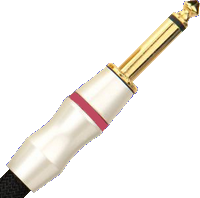
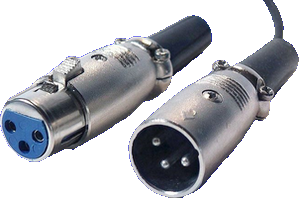
Jack plug (left) and XLR (right)
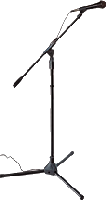
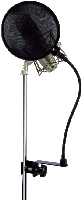

No need to go on and on forever, recording is rather easy. As long as you pay attention to your recording levels and take care over your takes, you should get a satisfying result, good enough to finalize the song
Messages page # 1 2 3 4 5 6 7 8 9 10 11 12 13 14 15 16 17 18 19 20 21 22 23 24 25 26 27 28 29 30 31 32 33 34 35

Em
le 30/07/2013 à 15h51
Hello from the Philippines,
I like your site about home studio recording, the articles are very helpful for me, though I still don't have a song project (Busy at work) I'm looking forward to using what I have learned from your tutorial.
Thanks
* * * * * * * * * * * * * * * *
<em>
Wow! Nice to know that readers from the other side of the planet read my website!
I hope you can start recording your own songs soon. Enjoy!
Grebz</em>
jjchampbulle
le 30/07/2013 à 15h12
Un grand merci pour la clarté de vos explications. Je suis débutant en MAO et vos commentaires sont bienvenus au moment où je dois remplacer mon matériel informatique.
* * * * * * * * * * * * * *
<em>Content de pouvoir vous aider, et bienvenue dans le monde de la MAO !
Grebz</em>
Gratteux41
le 19/05/2013 à 12h27
Bonjour, j'ai téléchargé AcmeBarGig Brain 2, mais c'est juste un fichier .dll ?!
Je ne comprends pas comment m'en servir... ;)
Merci
* * * * * * * * * * * * * * * *
<em>
Bonjour et bienvenue sur mon site.
En effet, tous les simulateurs proposés sont au format VST pour Windows. Ce ne sont donc pas des logiciels indépendants, il faut obligatoirement les utiliser au sein d'un séquenceur, ou de n'importe quel logiciel permettant d'utiliser des VST.
Certains existent également pour Mac, mais il faudra aller les chercher vous-même sur le site de l'éditeur (j'en donne toujours le lien lorsqu'il existe), car étant utilisateur PC, je ne peux pas vérifier et tester les versions Mac. Or, je me suis fixé de ne proposer au téléchargement que des choses que je peux moi-même utiliser, vérifier.
Sinon, pour utiliser ces fichiers dll, la méthode est donnée ici : <a href="http://www.grebz.fr/simulator.php#howto">Comment utiliser les plugins de simulation d'ampli dans un séquenceur</a>.
Grebz</em>
knophe
le 22/04/2013 à 01h09
Je trouve le site super ! Et c'est encore plus super quand il y a ce que l'on cherche et gratuit !!! Merci encore du partage!!
wil85
le 29/01/2013 à 17h22
Bonjour,
Merci pour les conseils sur votre site, pour un débutant comme moi c'est parfait.
Par contre, quels seraient les réglages à effectuer sur les toms (EQ, compression, etc)
Merci
* * * * * * * * * * * * * * * *
<em>Bonjour,
Merci de votre visite sur mon site.
Pour les toms, voici les réglages par défaut que j’utilise.
Je précise que je me sers aujourd'hui du logiciel de batterie Fxpansion BFD2 pour composer mes batteries.
Mes réglages par défaut sont adaptés à mes goûts et aux toms que j’utilise. Si j’avais choisi d’autres toms, mes réglages auraient été différents, bien entendu. Ils ne vous conviendront donc peut-être pas, mais cela vous fera une base de travail.
Tom floor : Tamburo Opera Floor Tom
Tom mid : Ludwig Vistalite
Tom high : DW
<strong>Réglages Tom floor :</strong>
EQ :
Brickwall à 60Hz (coupure nette de toute fréquence inférieure)
+6dB à 82Hz
+2dB à 282Hz
-4dB à 1,5KHz
+1,7dB à 6,12KHz
Hi-shelf de -6dB à 14,8KHz
Compression :
Threshold à -18dB
Ratio 12:1
Attack 15ms
Release 60ms
Gain 3dB
<strong>Réglages Tom mid:</strong>
EQ :
Brickwall à 60Hz (coupure nette de toute fréquence inférieure)
+3dB à 104Hz
-2,5dB à 530Hz
+2dB à 950Hz
-3,7dB à 2,12KHz
Compression :
Threshold à -18dB
Ratio 8:1
Attack 15ms
Release 60ms
Gain 3,6dB
<strong>Réglages Tom floor :</strong>
EQ :
Brickwall à 80Hz (coupure nette de toute fréquence inférieure)
-9dB à 139Hz
+2dB à 835Hz
-3dB à 2,66KHz
+3dB à 7,9KHz
Compression :
Threshold à -18dB
Ratio 8:1
Attack 15ms
Release 60ms
Gain 5dB
À moduler en fonction de vos goûts, et surtout à adapter en fonction de la chanson. Il n’existe pas de réglages qui conviennent pour tout. Les hausses et baisses de fréquences doivent être ajustées en fonction des autres instruments pour éviter de masquer ou au contraire d’amplifier certaines fréquences. Ça se fait à l’oreille, dans le contexte de la chanson, avec la musique qui joue.
Bon courage !
Grebz</em>