

? | Home page | Tutorial | Recording

I prefer to record them last but there are no rules. If you prefer to record them first, then do so.
To record vocals, make sure the place is quiet, shut the door, tell the people who live with you to be quiet, and do not record while your neighbor is drilling holes through his kitchen walls! Also, turn off your monitors and use a headset instead to avoid recording the playback with your microphone.
Condenser or dynamic microphones?
Dynamic microphones are solid, they don' need a power source, they can take heavy acoustic pressure (like a kick drum or a saxophone) and they are not too expensive. They are also less sensitive to surrounding noises than condenser microphones. The cons are they lack clarity in the high range, which renders takes less clear and defined than with condenser microphones. They can be used with Jack or XLR plugs.
Condenser microphones are much more responsive and accurate. Their high sensitivity is double-edged, because they will capture any noise when recording. The fans of your PC are noisy? Chances are this noise will be recorded. Sound comes out of your headset? It will be recorded by your condenser microphone. Children are loudly playing outside? You might get that too. However, some condenser microphones are called "cardioid", or "hyper cardioid", and they only record what comes from a specific direction, ignoring (more or less) other sound sources from other directions. On the contrary, omnidirectional microphones record what comes from anywhere. Not ideal for a home studio. Condenser microphones are also more fragile (don't knock them) and must be powered through a "phantom power", whose standard is 48 volts. This kind of power is either present on your audio interface and can be turned on and off with a button, or it will require the use of an external phantom power source that you will then connect to your audio interface. You have to use 3-pin XLR plugs that carry the phantom power current. Finally, condenser microphones are usually rather expensive, some of them cost several thousand euros (or dollars, or pounds), but only professional studios or rich amateurs can afford those. On the plus side, the sound you get with a condenser microphone will have the best quality.
Be cautious though, a good dynamic microphone is worth better than a bad condenser microphone. No big secret here, for microphones like for anything else, very low prices are rarely synonymous with good quality.
A few known and renowned microphone brands: AKG, Milab, Neumann, Rode, Sennheiser, Shure...
Some pieces of advice: buy a microphone stand and a pop filter (you can also make one yourself with wire and a piece of tights from your wife / girlfriend / mother / daughter / neighbor). The stand will prevent you from manually holding your microphone and thus produce handling noises. As for the pop filter, it prevents the air to hit the microphone and produce unwanted blowing sounds when you pronounce some letters such as "p" or "b".
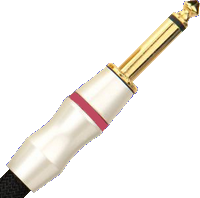
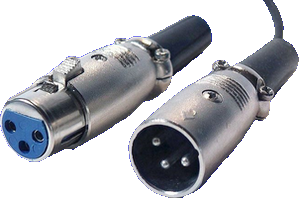
Jack plug (left) and XLR (right)
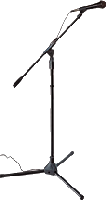
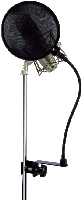

No need to go on and on forever, recording is rather easy. As long as you pay attention to your recording levels and take care over your takes, you should get a satisfying result, good enough to finalize the song
Messages page # 1 2 3 4 5 6 7 8 9 10 11 12 13 14 15 16 17 18 19 20 21 22 23 24 25 26 27 28 29 30 31 32 33 34 35

Moss
le 29/11/2014 à 09h04
Bravo, c'est clair et intelligent, sans les lieux communs habituels. Mais petite erreur sur la compression, ayant beaucoup travaillé sur le sujet : l'attack et le release commencent dès que le signal franchit le seuil, dans un sens ou dans l'autre. Il n'y a pas de temporisation mais un fade-in pour l'attaque et un fade-out pour le release, plus ou moins lents selon le réglage.
Neyutakim
le 21/10/2014 à 01h36
Super mon gars, et surtout un grand merci pour tout ce que tu fais !!! C`est vraiment cool !!! Vraiment !! Continue comme ça !!! merci.
SoloDuck
le 16/08/2014 à 14h11
Salut Grebz,
Nickel tes tutos, très très utile. Je suis assez fan des simu de LePou, juste un détail qui me chagrine, tu fournis les presets de tes démos .fxp, mais comment les charger dans les simu ? Je me ramasse une erreur "Metal - HyBrit.fxp This file is not a preset or bank for Poulin_HyBrit_Head_v1_1a." Y aurait-il des versions différentes ? A+ m/
* * * * * * * * * * * * * * * *
<em>Bonjour,
Après vérification, les presets fxp fonctionnent bien chez moi dans Sonar et dans Reaper, mais je ne dispose pas d'autres séquenceurs pour vérifier. Je suis en train de réaliser des captures d'écran de chacun des presets, afin que vous puissiez reproduire les réglages, même sans le fichier de preset.
Vous pouvez accéder aux captures d'écran avec un lien que j'ajoute en-dessous de chaque preset téléchargeable.
Grebz</em>
zimblot
le 08/07/2014 à 17h34
Bonjour,
En préambule, je tiens à vous féliciter pour votre site et l'altruïsme dont vous faites preuve. Merci. Ma question : J'ai téléchargé sur votre site, 5ORCERY. J'aimerais savoir (si c'est possible) à quels styles de morceaux correspondent chacun des presets de ce plugin. N'étant pas "un chat" dans la MAO, je les utilise à l'intuition et quand même un peu à l'écoute, mais c'est vraiment empirique. Si vous pouviez me guider je vous en serais très reconnaissant.
Merci d'avance.
Cordialement.
Jazzhands
le 07/06/2014 à 21h37
Another free DAW to add is <a href="http://lmms.sourceforge.net/home.php" target="_blank">LMMS</a>. I use the Windows version.
Traduction :
Autre séquenceur gratuit, <a href="http://lmms.sourceforge.net/home.php" target="_blank">LMMS</a>. J'utilise la version Windows.
* * * * * * * * * * * * * * * * * * * *
<em>Thanks for the tip, but LMMS doesn't allow for audio recording. You can process audio that you import into it (audio recorded through another recording software of your choice, or any audio files you have at your disposal), but it's too big a limitation for me to consider presenting it.
It is a major drawback in my opinion, for all the people who want to record vocals or instruments through a microphone, or by plugging it directly.
Of course, for anyone who only wants to use virtual instruments or existing audio files, LMMS will be an option. And it's free, as you mentioned.
Among great free software that compete with commercial software, you have GIMP (vs Photoshop), Blender (vs 3D Studio and Maya), Open Office and Libre Office (vs Microsoft Office), but I'm still waiting for a complete free D.A.W. that could rival with Sonar, Cubase or ProTools and such...
Reaper is what comes closest to that dream as it can be used for free without limitations, but it's not a freeware and you are supposed to pay for it if you use it.
Traduction :
Merci du tuyau, mais LMMS ne permet pas d'enregistrer de l'audio. On peut traiter de l'audio que l'on importe (enregistré avec un autre logiciel d'enregistrement de son choix, ou tout fichier audio à disposition), mais c'est une limitation trop important pour que j'envisage d'en faire une présentation.
C'est un inconvénient rédhibitoire à mes yeux pour tous ceux qui souhaitent enregistrer des voix ou des instruments via un micro ou en branchement direct.
Bien sûr, pour ceux qui se contentent d'utiliser des instruments virtuels ou des fichiers audio existants, LMMS est un choix possible. Et gratuit, comme vous l'avez dit.
Parmi les excellents logiciels gratuits susceptibles de rivaliser avec des logiciels payants, il y a GIMP (vs Photoshop), Blender (vs 3D Studio et Maya), Open Office et Libre Office (vs Microsoft Office), mais j'attends toujours l'arrivée d'un séquenceur gratuit capable de rivaliser avec Sonar, Cubase, ProTools et leurs équivalents...
Reaper est ce qui s'approche le plus de ce rêve puisqu'il est utilisable gratuitement sans limitations, mais ce n'est pas un logiciel gratuit pour autant et vous êtes censé le payer si vous vous en servez.
Grebz</em>