

? | Home page | Tutorial | Recording

I prefer to record them last but there are no rules. If you prefer to record them first, then do so.
To record vocals, make sure the place is quiet, shut the door, tell the people who live with you to be quiet, and do not record while your neighbor is drilling holes through his kitchen walls! Also, turn off your monitors and use a headset instead to avoid recording the playback with your microphone.
Condenser or dynamic microphones?
Dynamic microphones are solid, they don' need a power source, they can take heavy acoustic pressure (like a kick drum or a saxophone) and they are not too expensive. They are also less sensitive to surrounding noises than condenser microphones. The cons are they lack clarity in the high range, which renders takes less clear and defined than with condenser microphones. They can be used with Jack or XLR plugs.
Condenser microphones are much more responsive and accurate. Their high sensitivity is double-edged, because they will capture any noise when recording. The fans of your PC are noisy? Chances are this noise will be recorded. Sound comes out of your headset? It will be recorded by your condenser microphone. Children are loudly playing outside? You might get that too. However, some condenser microphones are called "cardioid", or "hyper cardioid", and they only record what comes from a specific direction, ignoring (more or less) other sound sources from other directions. On the contrary, omnidirectional microphones record what comes from anywhere. Not ideal for a home studio. Condenser microphones are also more fragile (don't knock them) and must be powered through a "phantom power", whose standard is 48 volts. This kind of power is either present on your audio interface and can be turned on and off with a button, or it will require the use of an external phantom power source that you will then connect to your audio interface. You have to use 3-pin XLR plugs that carry the phantom power current. Finally, condenser microphones are usually rather expensive, some of them cost several thousand euros (or dollars, or pounds), but only professional studios or rich amateurs can afford those. On the plus side, the sound you get with a condenser microphone will have the best quality.
Be cautious though, a good dynamic microphone is worth better than a bad condenser microphone. No big secret here, for microphones like for anything else, very low prices are rarely synonymous with good quality.
A few known and renowned microphone brands: AKG, Milab, Neumann, Rode, Sennheiser, Shure...
Some pieces of advice: buy a microphone stand and a pop filter (you can also make one yourself with wire and a piece of tights from your wife / girlfriend / mother / daughter / neighbor). The stand will prevent you from manually holding your microphone and thus produce handling noises. As for the pop filter, it prevents the air to hit the microphone and produce unwanted blowing sounds when you pronounce some letters such as "p" or "b".
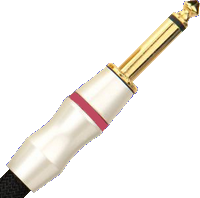
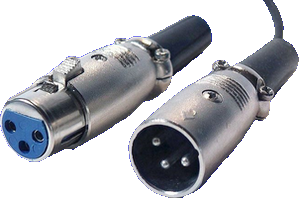
Jack plug (left) and XLR (right)
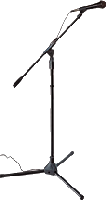
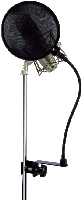

No need to go on and on forever, recording is rather easy. As long as you pay attention to your recording levels and take care over your takes, you should get a satisfying result, good enough to finalize the song
Messages page # 1 2 3 4 5 6 7 8 9 10 11 12 13 14 15 16 17 18 19 20 21 22 23 24 25 26 27 28 29 30 31 32 33 34 35

sailors33
le 15/10/2013 à 08h19
Félicitations et merci pour ce site très complet, je le mets en favori. Merci encore.
* * * * * * * * * * * * * * *
<em>De rien et merci à vous de votre visite.
Grebz</em>
Flow
le 29/09/2013 à 19h05
Hello,
Je viens de découvrir votre site... !
Excellent... ! Il n'y a pas d'autres mots pour le qualifier ! Vraiment du bon boulot... !
Félicitations, continuez !
* * * * * * * * * * * * * * * *
<em>Eh bien... Merci beaucoup !
Grebz</em>
Flames
le 26/09/2013 à 12h45
Félicitations pour ce partage de connaissances simple et efficace.
Voilà quelques mois que je galère à la recherche d'informations relativement complètes sur la production de morceau et tout se trouve miraculeusement ici.
Un gros big up et bonne continuation dans ton travail. J'attends impatiemment la réalisation de la section Mastering ;)
* * * * * * * * * * * * * * * *
<em>Merci beaucoup. Content de pouvoir être utile.
La section Mastering est aujourd'hui terminée.
Grebz</em>
Pastourelle1763
le 02/09/2013 à 21h41
Je découvre avec bonheur votre blog, magnifique et tellement clair et généreux d'explications.
J'étais avant ma retraite électronicien et informaticien par obligation.
Je suis clarinettiste, et j'utilise des logiciels de notation musicale comme Notion 3, par exemple pour créer mes partitions et le logiciel Magix Samplitude Studio.
Votre avis sur ce logiciel pour mes créations futures sera le bienvenu.
Vraiment bravo pour le partage de vos connaissances.
Bien cordialement,
Pastourelle
* * * * * * * * * * * * * * * *
<em>Bonjour et merci de votre visite sur le site.
Mon avis sur ces logiciels ne vous sera pas d'une grande aide, car je n'ai jamais eu l'occasion d'utiliser ni l'un ni l'autre, mais ils semblent tous deux permettre de travailler convenablement la musique.
Comme toujours, le meilleur logiciel est celui qui permet d'atteindre le résultat voulu, et avec lequel on se sent à l'aise.
Grebz</em>
Albe
le 02/09/2013 à 15h30
Salut ! Et bravo pour ton blog !!
Par contre je ne comprends pas comment on fait pour les impulsions gratuites. Y a que des fichiers Wav, comment faire pour installer ?
Merci
* * * * * * * * * * * * * * * *
<em>Bonjour et merci du message.
Les impulsions ne "s'installent" pas. Ce sont en effet de petits fichiers wav à utiliser dans un chargeur d'impulsion, qui sert de simulateurs de haut-parleur, de "cab" comme on dit.
Autrement dit, pour reconstituer un ampli complet, il faut :
- un simulateur de tête d'ampli. Comme le LE456 de LePou par exemple, ou le NRR1 d'Ignite Amps... il y en a plein sur ce site.
- Un chargeur d'impulsions, comme LeCab 2 de LePou. Vous les trouverez également ici.
- Dans le chargeur d'impulsions, il va falloir charger des impulsions. LeCab 2 permet d'en charger jusqu'Ã 6 simultanément.
Voilà pourquoi les impulsions sont des fichiers WAV, ce ne sont pas des "programmes" à part, mais des sortes de reproduction sonore correspondant aux caractéristiques d'une vraie enceinte enregistrée avec un vrai micro à une distance et une position bien précises.
Grebz</em>