Messages | Version française |


? | Home page | Tutorial | Mixing in practice | Lead guitars

Site de Grebz
Home page


LEAD GUITARS

Reminder: we are working on the song Life, an original composition:


(mp3 file)

Life features two lead guitars playing the same part. However, I recorded both guitar tracks from start to finish; I didn't just copy and paste them. The first guitar is panned to the left and the other to the right. Both guitars were recorded with a Fender Stratocaster plugged directly into an M-Audio AudioBuddy preamp, which was connected to an Edirol FA-101 audio interface. I didn't use a real guitar amp recorded with microphones. Everything was done using amp and cabinet simulation plugins along with various effect plugins.

Here is the complete list of plugins used for the first lead guitar:
* Rea-Gate by Cockos, a free noise gate
* X50 by TSE Audio, a free guitar amp simulator
* LeCab 2 by Poulin, a free IR loader for my cabinet impulses
* EnglPro cabinet impulses from the RedWirez BigBox paid collection ($9 USD per cabinet, with bulk discounts)
* TrackPlug by Wave Arts, a parametric equalizer

Here is the complete list of plugins used for the second lead guitar:
* 808 by TSE Audio, an overdrive pedal simulation
* Harmony by Simple VST, a free guitar amp simulator
* LeCab 2 by Poulin, a free IR loader for my cabinet impulses
* Peavey 5150 cabinet impulses from the RedWirez BigBox paid collection ($9 USD per cabinet, with bulk discounts)
* Rea-Gate by Cockos, a free noise gate
* TrackPlug by Wave Arts, a parametric equalizer

And finally, the plugins applied to the bus where the sounds of the two guitars (previously processed separately) meet:
* FinalPlug by Wave Arts, a limiter
* WizooVerb by Wizoo, a software reverb that has been out of production for several years.

For the paid plugins, I will suggest free alternatives that can be used instead.

Lead Guitar 1 Track - Lead Guitar 2 Track - Lead Guitar Bus

We will now take a detailed look at how the plugins are configured on the tracks and the bus for both guitars.

Mixing in practice : Preparing the session | Bass | Drums | Rhythm guitars | Lead guitars | Synths | Vocals | Mastering
Haut de page

LEAD GUITAR 1

Raw Sound - Noise Gate - Amp Head Simulator - Cabinet Simulator - Equalization

Mono audio track
Panning: 20% left. Lead guitar 2 will be placed symmetrically on the right. Since the sounds of the two lead guitars are different, they will complement each other without blurring in the center, thus freeing up the central space for the bass, vocals, kick, and snare, while the far left and right are reserved for rhythm guitars, cymbals, and two synths.
Volume: 0 dB
The plugins used are chained in this order: noise gate, amp head simulator, cabinet simulator, parametric equalizer.

Lead Guitar 1 Raw Sound

Here is the sound of lead guitar 1 before applying any processing


(mp3 file)

Note that the raw guitar sound is completely masked during the song. I'm including it here to let you hear guitar 1 exactly as it was recorded. A raw guitar sound is interesting in the case of an acoustic guitar recorded with one or more microphones placed in front of it, but the raw sound of an electric guitar isn't particularly useful on its own.

Noise Gate

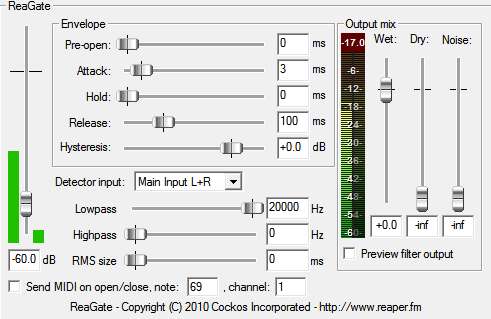
I use this plugin to remove the background hiss of the electric guitar when its volume drops below a certain threshold. The threshold here is -60 dB. If the volume of the lead guitar 1 audio track falls below this threshold, the sound is cut. This plugin is useful because the settings used by the amp simulator chosen for this guitar generate a significant amount of hiss that becomes too audible when no notes are being played. Here are the settings used with the Rea Gate plugin by Cockos:

Rea Gate Plugin
Rea Gate Plugin

Amp Head Simulator

Here is the sound of lead guitar 1 going through an amp head simulator


(mp3 file)

As with real hardware, this sound isn't enough on its own; we'll need to run the signal through a cabinet.

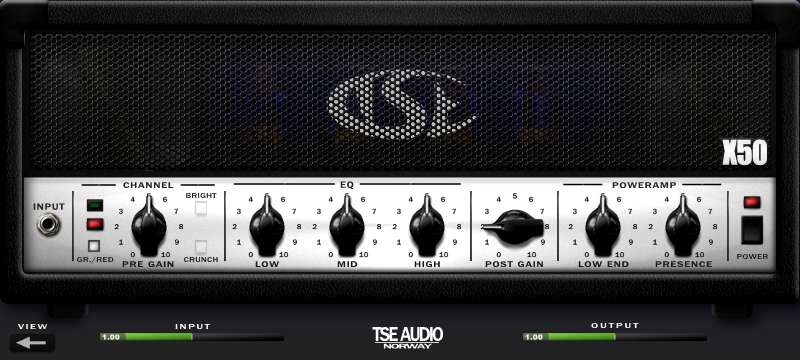
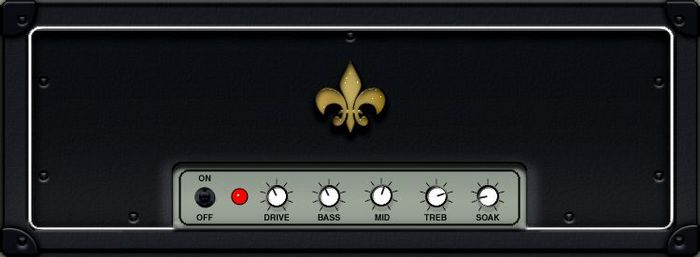
For Lead Guitar 1, I chose the X50 plugin from TSE Audio, one of the best free tube amp simulators. It is available for download here.

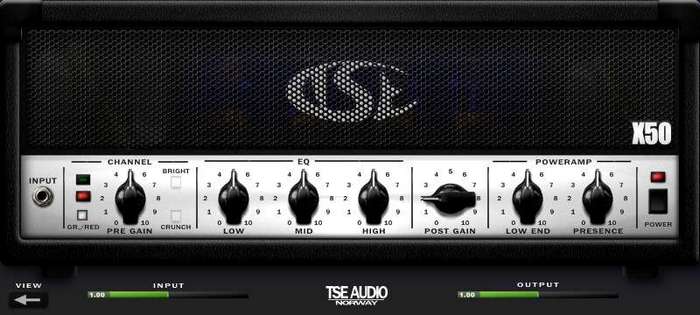
Here are the settings used with the TSE Audio X50 plugin (see screenshot below). To complete the sound of this amp simulator, a cabinet simulator still needs to be added.
X50 Plugin
X50 Plugin
X50 Plugin
X50 Plugin

Cabinet Simulator

Here is the sound of lead guitar 1 passing through saturation, an amp head simulator, and a cabinet


(mp3 file)

This sound could stand on its own, but it's very dry. We still need to add a bit of reverb.

As with real hardware, we now need to connect the amp head (simulated by the X50 plugin) to a cabinet. We'll use the free LeCab 2 plugin by Poulin, into which we'll load impulses. Impulses are "sonic fingerprints" of real cabinets. LeCab 2 allows you to load up to 6 impulses simultaneously. I only used 2 impulses for lead guitar 1, so the screenshot below only shows 2 of the 6 available slots. If you want to download free impulses, you can find some on this page of my site, a bit unorganized... feel free to browse for the ones you need or find others on the web.

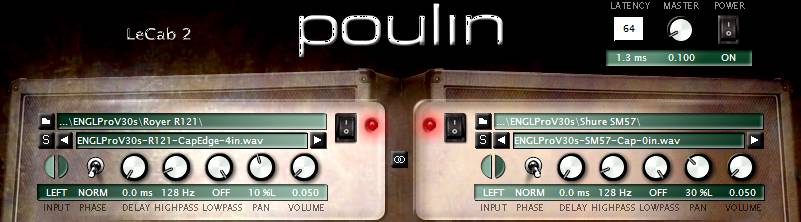
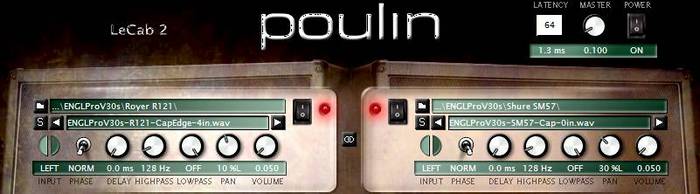
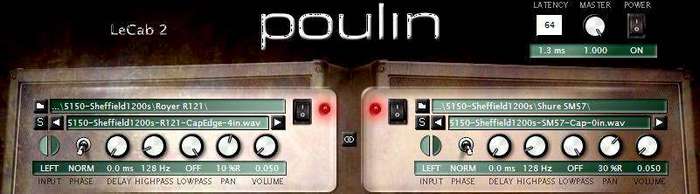
Here are the settings used with the Poulin LeCab 2 plugin:

- I used RedWirez impulses, a high-quality paid collection. Specifically, I used impulses from an EnglPro cabinet equipped with Celestion V30 speakers (the real model costs around €1,000 and weighs over 50 kg!).

- First impulse:

- I chose an impulse taken at the speaker's cap edge with a Royer R-121 mic placed 4" from the grill.

- "Phase": Norm (normal). You can choose normal or inverted phase. This helps eliminate phase issues between different impulses, or when combined with "delay," can produce special effects based on the interaction between impulses.

- "Delay": 0 ms. This knob delays the playback of the sound using this impulse (between 0 and 4.6 ms). I don't need it here, so I left it at 0 ms.

- "HighPass": 128 Hz. I set this parameter to attenuate all frequencies below 128 Hz.

- "LowPass": Off. This knob attenuates high frequencies above the chosen frequency. I'm not concerned with it here, so I didn't enable it.

- "Pan": 10% left

- "Volume": set to 0.050, a very low value because the X50 head with these settings sends a very high volume to the cabinet. To avoid unwanted digital clipping, I had to set this volume very low. The plugin's Master volume is also set very low, at 0.1.

- Second impulse:

- I chose an impulse taken at the speaker's cap edge with a Shure SM57 mic placed as close as possible to the grill.

- "Phase": Norm

- "Delay": 0 ms

- "HighPass": 123 Hz

- "LowPass": Off

- "Pan": 30% left

- "Volume": 0.050

- The blend of these two impulses makes up the sound of rhythm guitar 1.
LeCab 2 Plugin
LeCab 2 Plugin
LeCab 2 Plugin
LeCab 2 Plugin

Equalization

Here is the sound of lead guitar 1 processed with an amp, a cabinet, and reverb (in that order) before equalization...


(mp3 file)


And after equalization:


(mp3 file)

The sound of lead guitar 1 will then be sent to the Lead Guitar bus, where it will join the sound of lead guitar 2.

Now we need to sculpt the sound of lead guitar 1 so it fits as well as possible in the mix. I used the TrackPlug plugin from Wave Arts, an excellent paid parametric EQ. As an alternative, you can use Cockos ReaEQ, a free parametric equalizer that allows you to EQ the sound in much the same way as TrackPlug, though it is slightly less feature-rich for certain tasks.

Here are the settings used with the Wave Arts TrackPlug plugin:

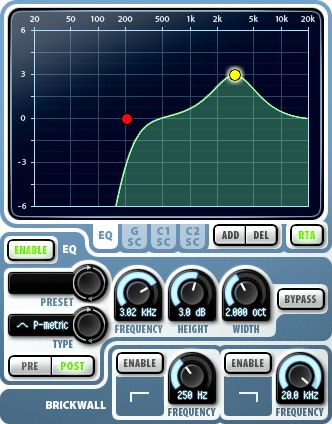
- I placed a HighPass band at 200 Hz (red dot) to start rolling off low frequencies from that point.

- However, I boosted 3.02 KHz by 3 dB with a 2-octave width (yellow dot) to better bring out the guitar's mid-range.

- No compression is applied to this guitar for now. A slight boost will be added using a limiter on the Lead Guitar bus.
TrackPlug Plugin
TrackPlug Plugin
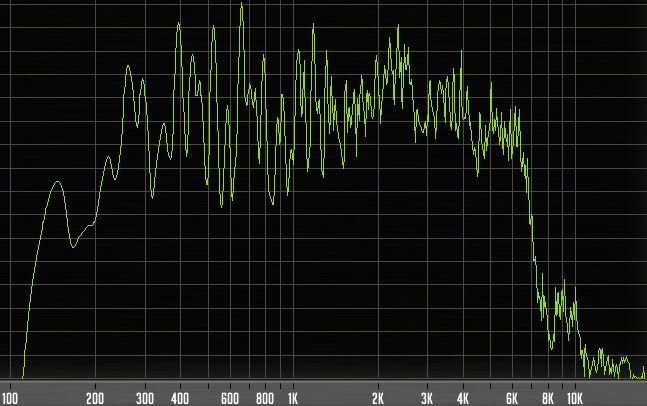
Lead guitar 1 frequencies
Mixing in practice : Preparing the session | Bass | Drums | Rhythm guitars | Lead guitars | Synths | Vocals | Mastering
Haut de page

LEAD GUITAR 2

Raw Sound - Amp Head Simulator - Cabinet Simulator - Equalization

Mono audio track
Panning: 90% right
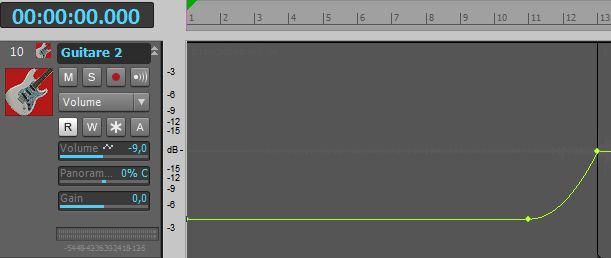
Volume: Variable, as I applied volume automation. From bar 1 to bar 11, the track volume is at -9 dB. From bar 11 to bar 13, I applied a slow exponential curve that rises to 0 dB. The track volume then remains constant at 0 dB. The goal here is to produce a volume swell (fade-in) to create tension and an "announcement" effect. Heads up—the intro is ending, something new is about to happen!
Life - Lead guitar 2 volume automation
Lead guitar 2 volume automation

The plugins used are chained in this order: amp head simulator, cabinet simulator, parametric equalizer.

Lead Guitar 2 Raw Sound

Here is the sound of lead guitar 2 before applying any processing


(mp3 file)

Amp Head Simulator

Here is the sound of lead guitar 2 passing through an amp head simulator


(mp3 file)

As with real hardware, this sound isn't enough on its own; the signal needs to pass through a cabinet.

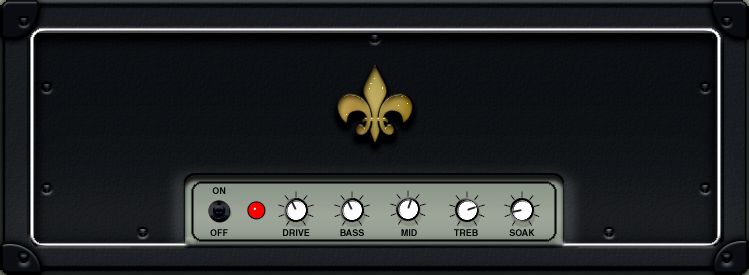
I'm adding an amp head simulator. I chose the Harmony plugin by Simple VST, as its tone complements lead guitar 1 very well. It is available for download here.

Here are the settings used with the Simple VST Harmony plugin (see screenshot below). To complete the sound of this amp simulator, we still need to add a cabinet simulator:
Harmony Plugin
Harmony Plugin
Harmony Plugin
Harmony Plugin

Cabinet Simulator

Here is the sound of lead guitar 2 passing through an amp head simulator and a cabinet


(mp3 file)

This sound could stand on its own, but it's very dry. We still need to add a bit of reverb.

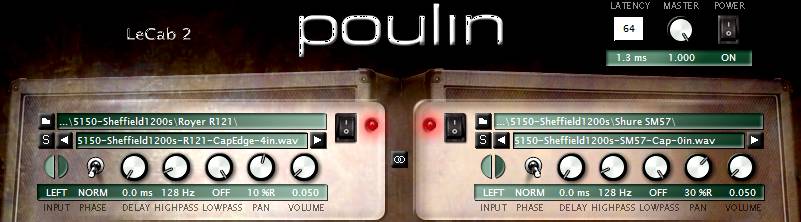
Just like with real gear, the amp head (simulated by the Harmony plugin) must now be connected to a cabinet. We will use the free LeCab 2 plugin by Poulin, into which we will load impulses. Impulses are "sonic fingerprints" of real cabinets. LeCab 2 allows you to load up to 6 impulses simultaneously. I only used 2 impulses for this part, so the screenshot below shows only 2 of the 6 available slots. If you wish to download free impulses, you can find some on this page of my site, though they are a bit unorganized... feel free to search for the impulses you need or find others on the web.

Here are the settings used with the Poulin LeCab 2 plugin:

- I used RedWirez impulses, a high-quality paid collection. For lead guitar 2, I used impulses from a Peavey 5150 cabinet equipped with Celestion Sheffield speakers (the real model is no longer in production but weighs nearly 45 kg!).

- First impulse:

- I chose an impulse taken at the speaker's cap edge with a Royer R-121 mic placed 4" (about 10 cm) from the grill.

- "Phase": Norm (normal). You can choose normal or inverted phase. This can be used to fix phase issues between different impulses or, combined with "delay," to produce special effects that play on the interaction between different impulses.

- "Delay": 0 ms. This knob is used to delay the playback of the sound using this impulse (between 0 and 4.6 ms). I don't need it here, so I left it at 0 ms.

- "HighPass": 128 Hz. I set this parameter to attenuate all frequencies below 128 Hz.

- "LowPass": Off. This knob attenuates high frequencies beyond the chosen frequency. I'm not using it here, so it remains inactive.

- "Pan": 10% right

- "Volume": Set to 0.050, a very low volume, but the plugin's Master volume is set to 1. Given the volume coming from the amp head, this is sufficient here.

- Second impulse:

- I chose an impulse taken at the center of the speaker's dome (cap) with a Shure SM57 mic placed against the grill.

- "Phase": Norm

- "Delay": 0 ms

- "HighPass": 128 Hz

- "LowPass": Off

- "Pan": 30% right

- "Volume": 0.050

- The blend of these two impulses makes up the sound of lead guitar 2.
LeCab 2 Plugin
LeCab 2 Plugin
LeCab 2 Plugin
LeCab 2 Plugin

Equalization

Here is the sound of lead guitar 2 processed with an amp, a cabinet, and reverb (in that order) before equalization...


(mp3 file)


And after equalization


(mp3 file)

The sound of lead guitar 2 will then be sent to the Lead Guitar bus, where it will join lead guitar 1.

Now we need to sculpt the sound of lead guitar 2 so it sits perfectly in the mix. On this track, I used the TrackPlug plugin from Wave Arts, an excellent paid EQ plugin. As an alternative, you can download Cockos ReaEQ, a free parametric equalizer that works much like TrackPlug, though it’s slightly less comprehensive for certain adjustments.

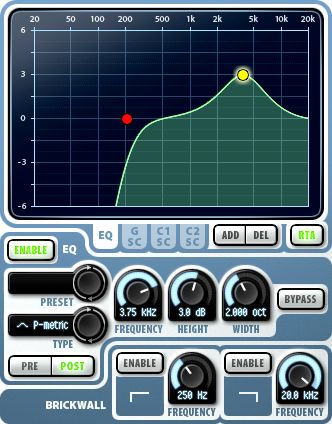
Here are the settings used with the Wave Arts TrackPlug plugin:

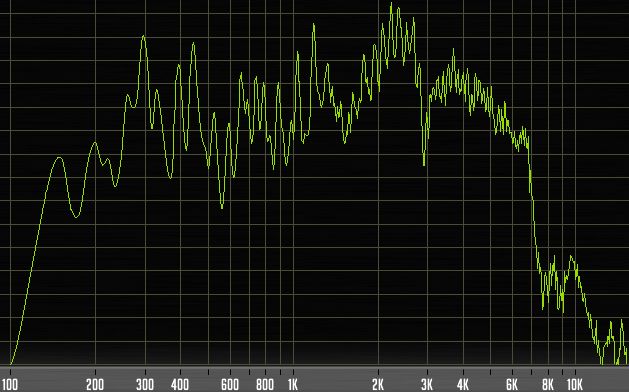
- I placed a HighPass band at 200 Hz (red dot) to start rolling off the low frequencies. You can see further down in the frequency analyzer screenshot that the volume drops rapidly below this frequency, dying out completely around 120 Hz.

- I boosted 3.75 KHz by 3 dB (yellow dot) to help the guitar's mid-range stand out.

- No compression is applied to this guitar for now. A slight boost will be added using a limiter on the Lead Guitar bus.
TrackPlug Plugin
TrackPlug Plugin
Lead guitar 2 frequencies
Mixing in practice : Preparing the session | Bass | Drums | Rhythm guitars | Lead guitars | Synths | Vocals | Mastering
Haut de page

LEAD GUITARS BUS

Here is the sound of the two lead guitars without the limiter...


(mp3 file)


And with the limiter


(mp3 file)

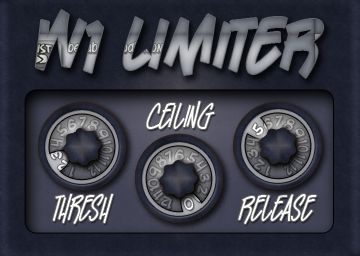
This stereo bus is where the sounds from both lead guitar tracks are summed. Here, I'm using the FinalPlug plugin by Wave Arts, a paid brickwall limiter that boosts the signal to make the guitars more prominent in the track. A brickwall limiter is a type of compressor that prevents the signal from exceeding a set level. If poorly adjusted (with too much compression), it can squash the sound and even cause distortion. When set correctly, it simply adds more "punch" to the audio. As an alternative, you can use George Yohng's W1 Limiter (shown here with the BetaBugsAudio interface), an excellent free limiter available for download here.

Here are the settings used with the Wave Arts FinalPlug plugin:

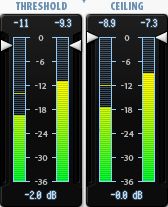
- "Threshold": -2 dB. The threshold is the level at which compression triggers to boost the signal. The -2 dB value chosen here is quite subtle, only boosting the signal by a maximum of 2 dB. The free Classic Master Limiter offers only this single adjustment, allowing you to set the threshold between -20 and 0 dB.

- "Ceiling": 0 dB. The ceiling is the maximum level the sound cannot exceed. In this case, any sound reaching within 2 dB of the maximum allowed bus volume is boosted by 2 dB but won't cross the ceiling. A 0 dB ceiling actually corresponds to the volume of the bus (or track) where the plugin is placed. Since the bus volume is -10 dB here, the actual threshold is -12 dB, and the actual ceiling is -10 dB.

Reverb

Here is the sound of the Lead Guitar bus processed with reverb.
You can only hear the effect of the reverb itself here.


(mp3 file)

I then set this reverb to 25% to achieve the desired effect.

Now that our lead guitars have passed through distortion, an amp head, and a cabinet, we'll add some "air" with a reverb plugin so the sound doesn't feel too cramped. I used WizooVerb, a plugin that hasn't been for sale for several years but still sounds great. It can still be found in the darker corners of the internet (I don't condone it, but you do as you wish), or you can use other paid or free reverb plugins. They are easy to find, and I suggest a few on this page. I commonly use SIR Convolution, which works with impulses, much like cabinet simulators. But instead of using cabinet impulses, we use room impulses recorded in various locations (from bathrooms to cathedrals, concert halls, or standard house rooms).

Here are the settings used with the WizooVerb plugin by Wizoo:

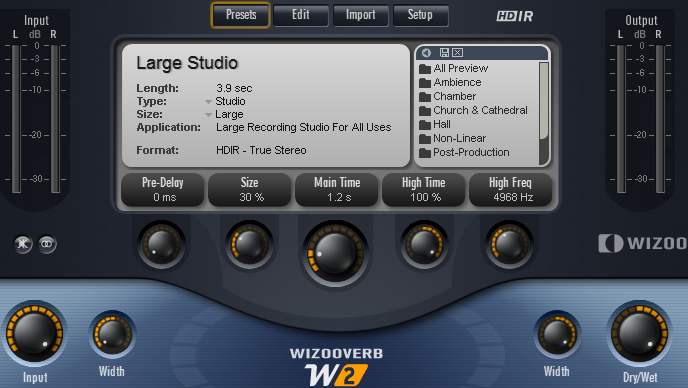
- I used the "Large Studio" preset (a versatile large recording studio). I reduced its "size" to 30% to avoid making it sound like a massive hall; the decay time is set to 1.2s and I adjusted the "Width" parameters so the reverb spreads across the stereo field. However, since the bus panning is set to 90% left, the reverb only propagates on the left side.

- The reverb amount is controlled with the "Dry/Wet" knob. At 0%, you hear no reverb at all; at 100%, you only hear the reverb without the dry signal. For lead guitar 1, it is set to 25%.

- Using reverb on a guitar is common practice. The dosage is a matter of personal preference, but too much reverb distances the instrument and can drown it in the mix.
WizooVerb Plugin
WizooVerb Plugin
- The lead guitar sound is now finalized for the mix. It will only be modified further during the final mastering stage.
FinalPlug Plugin
FinalPlug Plugin
W1 Limiter Plugin
W1 Limiter Plugin
Mixing in practice : Preparing the session | Bass | Drums | Rhythm guitars | Lead guitars | Synths | Vocals | Mastering
Haut de page
Top of page


MESSAGES

(leave a message)

Messages page # 1 2 3 4 5 6 7 8 9 10 11 12 13 14 15 16 17 18 19 20 21 22 23 24 25 26 27 28 29 30 31 32 33 34 35


Only
le 19/01/2011 à 21h18

Je suis en République Démocratique du Congo,dans la capitale Kinshasa. Je voudrais monter un home studio avec une bonne qualité de son. Je veux savoir comment installer le matériel, quelle est la disposition. C'est possible de monter un home studio avec un budget de 5000 euros ?

* * * * * * * * * * * * * * * *
<em>Je ne connais pas les tarifs au Congo, mais avec 5000 euros, tu peux déjà te faire plaisir. Après, tout dépend de ce que tu cherches. Si tu n'as rien du tout et que tu veux te faire un local avec isolation sonore, acheter un ordinateur, des logiciels et puis des instruments de musique, c'est pas sûr que ce soit suffisant.

Mais si c'est simplement pour acheter un ordinateur, une interface audio, un micro, un préampli et des enceintes de monitoring, alors oui, 5000 euros suffisent.

Un conseil : il faut que les élements cités ci-dessus soient homogènes dans la chaîne sonore. Inutile d'acheter un super micro très cher pour l'associer à un préampli bas de gamme. Tout doit être dans la même gamme de qualité (ce qui ne veut pas forcément dire dans la même gamme de prix !).

Pour plus de détails, parce que je ne peux pas répondre à tous sur chaque problème particulier, et que ce n'est pas le but de mon site, je vous conseille le site <a href="http://fr.audiofanzine.com/" target="_blanck">Audiofanzine</a>, qui est très complet et dont le forum est une mine d'informations inépuisable.

Grebz</em>


jeff2902
le 19/01/2011 à 19h51

Bonjour,

Je voudrais pouvoir obtenir un son proche de celui de groupes de pop-punk tel que <a href="http://www.youtube.com/watch?v=GcNiKCmWdYE" target="_blanck">All time Low</a> par exemple, un son assez propre.

J'utilise déjà Guitar Rig 4 et Amplitube mais les sons ne me conviennnent pas. J'ai essayé plusieurs amplis Lepou, mais impossible d'obtenir un son propre. Pourriez vous m'aider svp ? Je vous remercie d'avance.

PS : le MySpace du <a href="http://myspace.com/nastyshades" target="_blanck">groupe dans lequel je joue</a>.

* * * * * * * * * * * * * * * *

<em>D'après ce que j'entends, il y a un gros travail d'égalisation pour éviter les recoupements de fréquence, ce qui permet de bien séparer les sonorités des guitares. Je pense aussi qu'ils ont au minimum doublé les prises de guitare pour faire un effet "mur du son". Il y a des guitares partout qui jouent plus ou moins la même chose, on n'a pas un instant de repos.

La caisse claire est très en avant, de même que la voix lead. Juste après, on a les guitares, la basse est plutôt en retrait (en même temps, le bassiste ne fait pas grand-chose d'intéressant, il se contente de suivre les accords) et les cymbales sont assez discrètes aussi.

Il semblerait que le groupe All Time Low utilise des amplis et baffles Mesa, des simus de chez Line 6, et qu'ils font aussi appel à des simulateurs d'amplis et de baffles (comme moi !).

Fais des essais avec des simulations Nick Crow, le NRR1 d'Ignite Amps ou le Lecto de Lepou, en ajoutant un simulateur de baffle avec des impulsions de baffle MESA (je crois qu'il y en a dans celles que je propose).

Grebz</em>


Pioud
le 02/01/2011 à 12h16

Hello Grebz,

Super ton tuto sur la convolution ! Très intéressant !
Merci pour toutes ces informations !
Je vois peut être un axe d'amélioration afin d'obtenir une convolution de bonne qualité :
Lorsque tu relies la sortie de ton interface audio à ton ampli guitare, tu as un problème d'impédance qui n'est pas respecté : il faut je pense utiliser une boite de reamp (inverse d'une DI) afin d'adapter l'impédance.
Voilà, bonne continuation et bonne année !!!

PJ

* * * * * * * * * * * * * * * *

<em>Alors là, je n'en sais rien du tout. Dans les différents tutoriaux que j'ai pu lire ou voir en vidéo (en anglais dans la plupart des cas, c'est pour ça que j'ai décidé d'en faire un en français), je n'ai jamais rien vu qui concerne l'impédance. Ce qui ne veut pas dire que le problème ne se présente pas, d'ailleurs.
Mais je dois dire que je n'ai rien constaté de gênant lors de la création de mes impulsions. N'ayant pas de boîte de reamp, je ne vais pas pouvoir essayer, mais que ceux qui suivent le tuto n'hésitent pas à essayer d'en ajouter une dans la chaîne, histoire de vérifier que ça améliore les choses. Et si c'est le cas, tant mieux ! Tout ce qui peut contribuer à améliorer les techniques est le bienvenu.

Et bonne année à tous, bien entendu ! Bonheur, bonne bouffe et teint hâlé !

Grebz</em>


Brughes
le 27/12/2010 à 11h43

J'ai composé un morceau rythmique. Si cela t'intéresse, je te l'envoie.

* * * * * * * * * * * * * * * *

<em>Si vous avez des morceaux, indiquez-moi plutôt un lien où les écouter (myspace, jamendo ou autre...)

Grebz</em>


LaurentB
le 24/12/2010 à 11h41

Bonjour,

J'essaie Sonar X1 depuis quelques jours et je le trouve super, sauf un problème que je n'arrive pas à résoudre : voir mes plugins VST !

J'ai bien entendu précisé le chemin de mes plugins (program files\vstplugins)et la quasi-totalité de mes VST n'est pas visible quand je veux affecter un effet audio à une piste.

J'ai pourtant l'habitude de faire fonctionner des VST dans FL Studio ou Reaper.
Le plus bizarre, c'est que mis à part un ou deux rejetés, Sonar semble les voir lors du scan : je ne comprends pas.

Si vous pouvez m'aider, ça serait sympa.

Merci pour votre site et les impulsions d'ampli à télécharger.

* * * * * * * * * * * * * * * *

<em>Si vous utilisez un Sonar 64 bits sur un Windows 64 bits également, il ne faut pas oublier que Windows gère 2 dossiers Program Files différents. Le premier s'appelle "Program Files (x86)" et contient tous les programmes 32 bits. Le second s'appelle "Programmes" (dans la version française, et "Program Files" dans la version anglaise) et contient tous les programmes 64 bits.

Il est tout à fait possible de placer manuellement ses plugins dans l'un ou l'autre des répertoires, mais bien entendu, il faut indiquer à Sonar d'aller chercher dans les deux.

Dans mon cas, mes VST 32 bits sont dans ce répertoire-là :
C:\Program Files (x86)\Cakewalk\Vstplugins
Et mes VST 64 bits sont là :
C:\Programmes\Cakewalk\Vstplugins

Certains VST sont fournis avec un programme d'installation. Il ne faut pas simplement les placer manuellement dans le bon répertoire VST, ils vont s'installer eux-mêmes dans un répertoire spécifique, à moins bien sûr de choisir le répertoire VST lors de l'installation.

Par exemple, le simulateur d'ampli TH1 de Overloud s'installe par défaut dans le répertoire C:\Programmes\Overloud
Il n'est donc pas dans un répertoire VST. Pour que Sonar le voit (j'imagine que c'est pareil dans un autre séquenceur), il faut ajouter ce chemin dans le gestionnaire de plugins de Sonar, sinon il sera introuvable dans la liste des VST disponibles.

Grebz</em>

Top of page