Messages | Version française |


? | Home page | Tutorial | Mixing in practice | Rhythm guitars

Site de Grebz
Home page


RHYTHM GUITARS

Reminder: we are working on the song Life, an original composition of mine:


(mp3 file)

Life features two rhythm guitars playing different parts. The first guitar is panned to the left and the other to the right. Both guitars were recorded using a Fender Stratocaster plugged directly into an M-Audio AudioBuddy preamp, which was connected to an Edirol FA-101 audio interface. I didn't use a real guitar amp with microphones. Everything was done using amp and cabinet simulation plugins along with various effects plugins.

Here is the complete list of plugins used for the first rhythm guitar:
* Tube Saturator by Wave Arts, a vacuum tube saturation simulation
* Urrth by Simple VST, a free guitar amp simulator
* LeCab 2 by Poulin, a free impulse response (IR) loader for my cabinet impulses
* Orange PPC412 cabinet impulses from the RedWirez BigBox paid collection ($9 USD per cab, with volume discounts)
* WizooVerb by Wizoo, a software reverb
* TrackPlug by Wave Arts, a parametric equalizer

Here is the complete list of plugins used for the second rhythm guitar:
* Tube Saturator by Wave Arts, a vacuum tube saturation simulation
* Hybrit by Poulin, a free guitar amp simulator
* LeCab 2 by Poulin, a free impulse response (IR) loader for my cabinet impulses
* Vox AC30 Blues cabinet impulses from the RedWirez BigBox paid collection ($9 USD per cab, with volume discounts)
* WizooVerb by Wizoo, a software reverb
* TrackPlug by Wave Arts, a parametric equalizer

And finally, one last plugin applied to the bus where the sound of both guitars—previously processed separately—comes together:
* FinalPlug by Wave Arts, a limiter

For any paid plugins, I will suggest free alternatives you can use instead.

Rhythm Guitar Track 1 - Rhythm Guitar Track 2 - Rhythm Guitar Bus

We will now take a detailed look at the plugin settings on the tracks and the bus for both guitars.

Mixing in practice : Preparing the session | Bass | Drums | Rhythm guitars | Lead guitars | Synths | Vocals | Mastering
Haut de page

RHYTHM GUITAR 1

Raw sound - Tube Saturation - Amp Head Simulator - Cabinet Simulator - Reverb - Equalization

Mono audio track
Panning: 90% left. Therefore, the sound of rhythm guitar 1 will be heard almost exclusively on the left side.
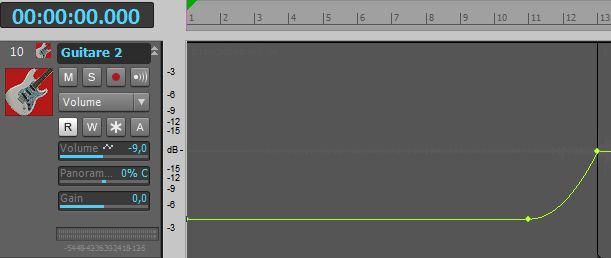
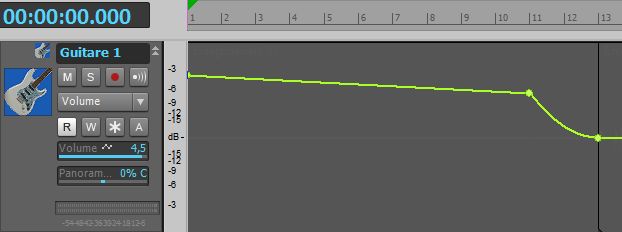
Volume: variable because I applied volume automation. From measure 1 to measure 11, the track volume goes from +4.5 dB to +3.5 dB following a linear curve. From measure 11 to measure 13, I applied a fast exponential curve descending to 0 dB. The track volume then remains constant at 0 dB. I did this because the recording level of the guitar at the beginning of the song was very low. Rather than re-recording this part, I preferred to use automation to adapt the volume to the mix's needs.
Life - Rhythm guitar 1 volume automation
Rhythm guitar 1 volume automation

The plugins used are chained in this order: tube saturation, amp head simulator, cabinet simulator, reverb, parametric equalizer.

Rhythm Guitar 1 Raw Sound

Here is the sound of rhythm guitar 1 before applying any processing


(mp3 file)

Obviously, as it is, the sound isn't very pleasant! It's just the direct sound of the electric guitar, so we're going to run it through various plugins to turn it into something more interesting.

Tube Saturation

Here is the sound of rhythm guitar 1 processed with tube saturation


(mp3 file)

At this stage, it's simply a direct-recorded guitar with added saturation. It still needs to go through an amp!

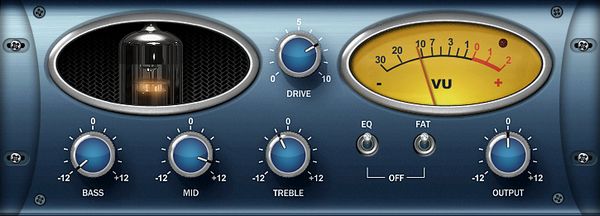
Here I'm using a plugin to add saturation to the sound, specifically tube saturation. It's not a distortion or overdrive pedal, but it warms up the sound nicely. I used Wave Arts' Tube Saturator.
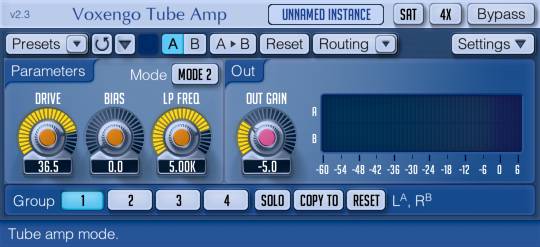
Since this is a paid plugin, you can replace it with Tube Amp, a free equivalent from Voxengo that provides the same type of tube saturation. Even if the settings differ, you can achieve a similar tone.

Here are the settings used with the Wave Arts Tube Saturator plugin:

- "EQ" is enabled (otherwise, "Bass," "Mid," and "Treble" functions are inactive)

- "Bass" is set to the minimum to attenuate low frequencies as much as possible

- "Mid" is set to 4 o'clock to help the guitar sound stand out

- "Treble" is at 11 o'clock to slightly decrease the high-end level

- "Drive" is set to 2 o'clock for a relatively warm saturation

- "Fat" is enabled. This allows for a higher level of saturation when turned on.

- "Output" is set to 12 o'clock. This is the output level, adjusted so the peak signal doesn't exceed 0 dB.

Tube Saturator Plugin
Tube Amp Plugin
A free equivalent: Voxengo's Tube Amp plugin.
The settings shown here provide nearly the same sound as Tube Saturator.

Amp Head Simulator

Here is the sound of rhythm guitar 1 going through saturation and an amp head simulator


(mp3 file)

As with real hardware, this sound isn't enough on its own; we'll need to run the signal through a cabinet.

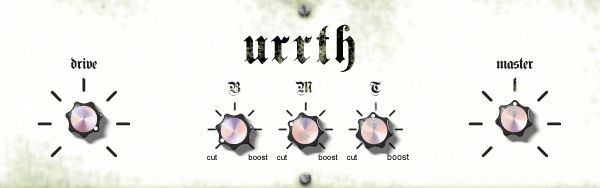
After the saturation plugin, I add an amp head simulator. To keep a light tone, I chose the Urrth plugin by Simple VST, a free amp simulator that produces nice clean sounds. It can be downloaded here.

Here are the settings used with the Simple VST Urrth plugin:

- "Drive" is cranked to the maximum. This is a gain knob: the more you increase it, the more both volume and distortion increase. However, even at max, the distortion remains quite light, adding to the saturation from the Tube Saturator plugin placed just before it.

- "B" (bass) is set to the minimum. I'm looking to remove as much low-end as possible from this guitar to leave those frequencies for instruments that need them more in this mix. The goal here is to have light rhythm guitars in a higher register.

- "M" (mid) is at 10 o'clock to slightly lower the mids produced by this amp. The sound tends to become muffled quickly when I try to increase the mid-level with this plugin.

- "T" (treble) remains centered. More is too much, less is not enough!

- "Master" is the amp's master volume. I leave it centered and adjust the volume directly on the bus. Since this amp simulator has a rather high output level, even with the volume centered, I have to set the bus volume to -33 dB to avoid clipping!

- To complete the sound of this amp simulator, we still need to add a cabinet simulator.
Urrth Plugin
Urrth Plugin

Cabinet Simulator

Here is the sound of rhythm guitar 1 going through saturation, an amp head simulator, and a cabinet


(mp3 file)

This sound could stand on its own, but it's very dry. We still need to add a bit of reverb.

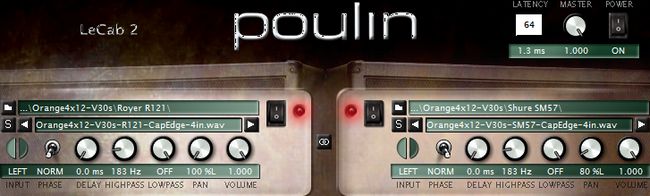
As with real hardware, we now need to connect the amp head (simulated by the Urrth plugin) to a cabinet. We'll use the free LeCab 2 plugin by Poulin, into which we'll load impulses. Impulses are "sonic fingerprints" of real cabinets. LeCab 2 allows you to load up to 6 impulses simultaneously. I only used 2 impulses for rhythm guitar 1, so the screenshot below only shows 2 of the 6 available slots. If you want to download free impulses, you can find some on this page of my site, though they are a bit unorganized... feel free to browse for what interests you or find others on the web.

Here are the settings used with the Poulin LeCab 2 plugin:

- I used RedWirez impulses, a high-quality paid collection. Specifically, I used impulses from an Orange PPC412 cabinet equipped with Celestion V30 speakers (the real model costs around €800 and weighs nearly 50 kg!).

- First impulse:

- I chose an impulse taken at the speaker's cap edge with a Royer R-121 mic placed 4" from the grill.

- "Phase": Norm (normal). You can choose normal or inverted phase. This helps eliminate phase issues between different impulses, or when combined with "delay," can produce special effects based on the interaction between impulses.

- "Delay": 0 ms. This knob delays the playback of the sound using this impulse (between 0 and 4.6 ms). I don't need it here, so I left it at 0 ms.

- "HighPass": 183 Hz. I set this parameter to attenuate all frequencies below 183 Hz.

- "LowPass": Off. This knob attenuates high frequencies above the chosen frequency. I'm not concerned with it here, so I didn't enable it.

- "Pan": 100% left

- "Volume": set to 1, the maximum value.

- Second impulse:

- I chose an impulse taken at the cap edge with a Shure SM57 mic placed 4" from the grill.

- "Phase": Norm

- "Delay": 0 ms

- "HighPass": 183 Hz

- "LowPass": Off

- "Pan": 80% left

- "Volume": 1

- The blend of these two impulses makes up the sound of rhythm guitar 1.
LeCab 2 Plugin
LeCab 2 Plugin

Reverb

Here is the sound of rhythm guitar 1 processed with reverb.
You can only hear the effect of the reverb itself here.


(mp3 file)

I then set this reverb to 25% to achieve the effect I'm looking for.

Now that our rhythm guitar 1 has passed through saturation, an amp head, and a cabinet, we'll add some "air" with a reverb plugin so the sound doesn't feel too confined. I used the WizooVerb plugin, which hasn't been sold for a few years but still sounds great. You can still find it in the darker corners of the internet (I don't condone it, but do as you wish), or you can use other paid or free reverb plugins. They are easy to find, and I suggest a few on this page. I commonly use SIR Convolution, which works with impulses just like cabinet simulators. But instead of cabinet impulses, you use room impulses recorded in various locations (from bathrooms to cathedrals, concert halls, or rooms in a house).

Here are the settings used with the Wizoo WizooVerb plugin:

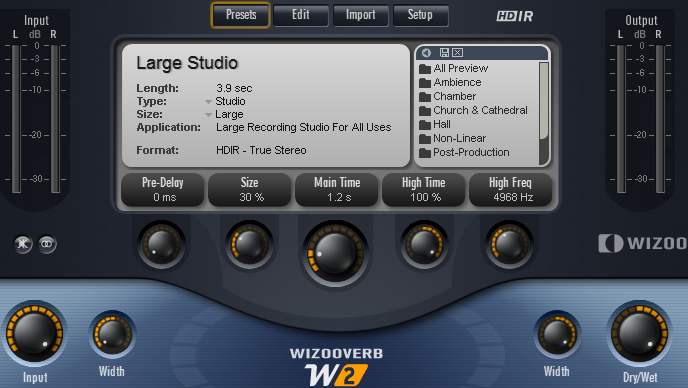
- I used the Large Studio preset (a large multi-purpose recording studio). I reduced its "size" to 30% to avoid making it sound like it was recorded in an enormous room. The reverb time is set to 1.2s, and I adjusted the "Width" parameters so the reverb spreads in stereo. However, since the bus panning is set to 90% left, the reverb only spreads on the left side.

- The reverb amount is controlled with the "DryWet" knob. At 0%, you hear no reverb at all; at 100%, you only hear the reverb and no dry sound. For rhythm guitar 1, it's set to 25%.

- Using reverb on a guitar is common. The dosage is a matter of personal preference, but too much reverb pushes the instrument away and drowns it in the mix.
WizooVerb Plugin
WizooVerb Plugin

Equalization

Here is the sound of rhythm guitar 1 processed with saturation, amp, cabinet, and reverb (in that order) before equalization...


(mp3 file)


And after equalization:


(mp3 file)

The sound of rhythm guitar 1 will then be sent to the Rhythm Guitar bus, where it will join rhythm guitar 2.

Now that the sound of rhythm guitar 1 is complete, it still needs to be sculpted to fit perfectly into the mix. I used Wave Arts' TrackPlug, an excellent paid parametric EQ plugin. As a replacement, you can use Cockos ReaEQ, a free parametric equalizer that allows you to equalize the sound in almost the same way, though it is slightly less feature-rich for certain tasks.

Here are the settings used with the Wave Arts TrackPlug plugin:

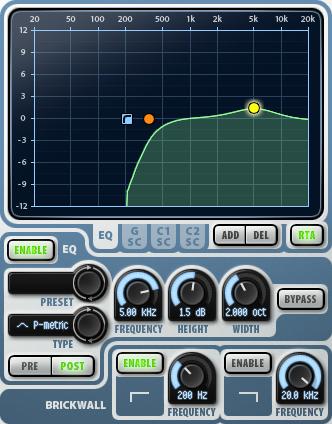
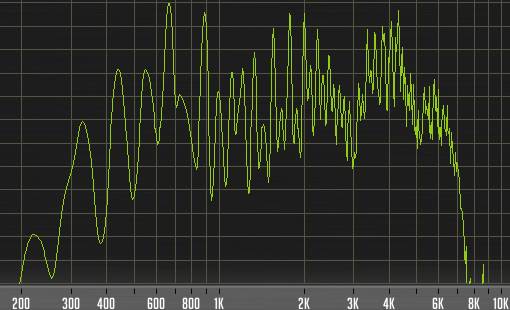
- I used a brickwall filter at 200 Hz to completely cut all low frequencies below this value. This simply reinforces what was done previously: bass at minimum on the Tube Saturator and Urrth amp, and the HighPass set to 183 Hz on LeCab 2. A quick look at a frequency analyzer (see screenshot below) confirms that nothing passes below 200 Hz. It's radical, but intentional.

- I placed a HighPass band at 350 Hz (orange dot) to begin rolling off low frequencies starting at this value. You can see in the screenshot that the volume decreases to about -10 dB before the brickwall sharply cuts the sound at 200 Hz.

- On the other hand, I very slightly boosted 5 KHz by 1.5 dB with a 2-octave width to bring out the guitar's brightness. There's no need to boost more here, as it would have made the sound too harsh and aggressive.

- No compression is applied to this guitar for now. A slight boost will be added using a limiter on the Rhythm Guitar bus.
TrackPlug Plugin
TrackPlug Plugin
Rhythm guitar 1 frequencies
Mixing in practice : Preparing the session | Bass | Drums | Rhythm guitars | Lead guitars | Synths | Vocals | Mastering
Haut de page

RHYTHM GUITAR 2

Raw sound - Amp Head Simulator - Cabinet Simulator - Reverb - Equalization

Mono audio track
Panning: 90% right
Volume: variable because I applied volume automation. From measure 1 to measure 11, the track volume is at -9 dB. From measure 11 to measure 13, I applied a slow exponential curve rising to 0 dB. The track volume then remains constant at 0 dB. The goal here is to produce a volume swell to create tension and act as a lead-in. Heads up: the intro is ending, and something new is about to happen!
Life - Rhythm guitar 2 volume automation
Rhythm guitar 2 volume automation

The plugins used are chained in this order: amp head simulator, cabinet simulator, reverb, parametric equalizer.

Rhythm Guitar 2 Raw Sound

Here is the sound of rhythm guitar 2 before applying any processing


(mp3 file)

As with Rhythm Guitar 1, here is the direct sound of the electric guitar, which we will run through various plugins to turn it into something more interesting.

Amp Head Simulator

Here is the sound of rhythm guitar 2 going through an amp head simulator


(mp3 file)

As with real hardware, this sound isn't enough on its own; we'll need to run the signal through a cabinet.

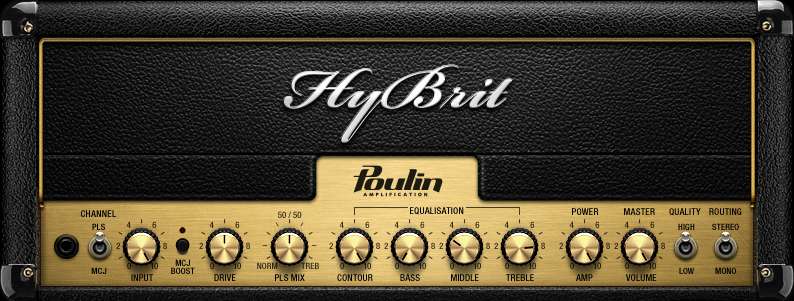
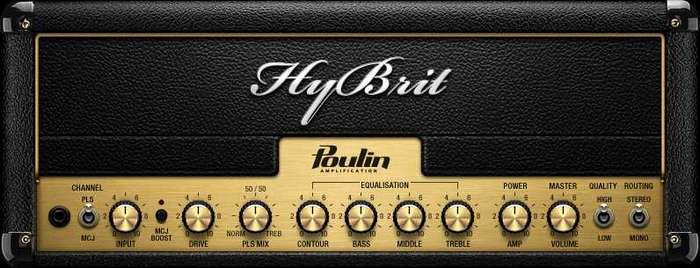
I'm adding an amp head simulator. I chose the Hybrit plugin by Poulin, which produces a very British vintage sound. The tone has more crunch than Rhythm Guitar 1, and their sonic characters complement each other well. It can be downloaded here.

Here are the settings used with the Poulin Hybrit plugin:

- "input" is set to maximum. This is the level of the signal entering the amp head.

- "PLS/MCJ": PLS. This switch allows for two different types of tones. They represent the two channels of the amp, with varying levels of distortion.

- "MCJ boost": intended for the MCJ channel. It is, of course, not enabled here since I chose the PLS channel.

- "Drive": set to 12 o'clock. This is the distortion level.

- "50/50 PLS Mix": set to 12 o'clock. This is a general tone setting, ranging from bass (which I find a bit dull) to treble (too aggressive for my taste if pushed to the max).

- "Cont" (contour): set to maximum. This knob affects the other EQ knobs: "Low", "Mid", and "High". The higher you turn it, the more influence the EQ settings will have. Conversely, the lower it is, the less impact the EQ settings will have.

- "Low" (bass) is set to the minimum. I'm looking to remove as much low-end as possible from this guitar to leave those frequencies for instruments that need them more in this mix. The goal here is to have light rhythm guitars in a higher register.

- "Mid" is at 3, to slightly lower the mids.

- "High" (treble) is at 8, for better clarity.

- "Power Amp": set to maximum. This is the gain level, which adds more or less saturation to the sound.

- "Master Volume": set to maximum. This is the amp's general volume knob.

- To complete the sound of this amp simulator, a cabinet simulator must be added.
Hybrit Plugin
Hybrit Plugin
Hybrit Plugin
Hybrit Plugin

Cabinet Simulator

Here is the sound of rhythm guitar 2 going through an amp head simulator and a cabinet


(mp3 file)

This sound could stand on its own, but it's very dry. We still need to add a bit of reverb.

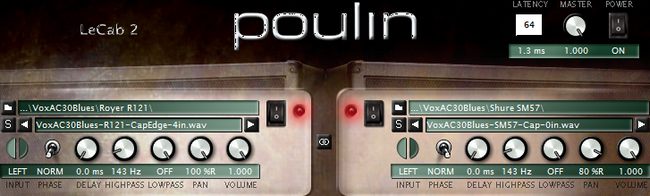
As with real hardware, we now need to connect the amp head (simulated by the Hybrit plugin) to a cabinet. We'll use the free LeCab 2 plugin by Poulin, into which we'll load impulses. Impulses are "sonic fingerprints" of real cabinets. LeCab 2 allows you to load up to 6 impulses simultaneously. I only used 2 impulses for the guitar, so the screenshot below only shows 2 of the 6 available slots. If you want to download free impulses, you can find some on this page of my site, though they are a bit unorganized... feel free to browse for what interests you or find others on the web.

Here are the settings used with the Poulin LeCab 2 plugin:

- I used RedWirez impulses, a high-quality paid collection. For rhythm guitar 2, I used impulses from a Vox AC30 Blues cabinet equipped with Celestion Alnico Blues speakers (the real model costs around €1,200 and weighs over 30 kg!).

- First impulse:

- I chose an impulse taken at the speaker's cap edge with a Royer R-121 mic placed 4" from the grill.

- "Phase": Norm (normal). You can choose normal or inverted phase. This helps eliminate phase issues between different impulses, or when combined with "delay," can produce special effects based on the interaction between impulses.

- "Delay": 0 ms. This knob delays the playback of the sound using this impulse (between 0 and 4.6 ms). I don't need it here, so I left it at 0 ms.

- "HighPass": 143 Hz. I set this parameter to attenuate all frequencies below 143 Hz.

- "LowPass": Off. This knob attenuates high frequencies above the chosen frequency. I'm not concerned with it here, so I didn't enable it.

- "Pan": 100% right

- "Volume": set to 1, the maximum value.

- Second impulse:

- I chose an impulse taken at the speaker's cap with a Shure SM57 mic placed against the grill.

- "Phase": Norm

- "Delay": 0 ms

- "HighPass": 143 Hz

- "LowPass": Off

- "Pan": 80% right

- "Volume": 1

- The blend of these two impulses makes up the sound of rhythm guitar 2.
LeCab 2 Plugin
LeCab 2 Plugin

Reverb

Here is the sound of rhythm guitar 2 processed with reverb.
You can only hear the effect of the reverb itself here.


(mp3 file)

I then set this reverb to 25% to achieve the effect I'm looking for.

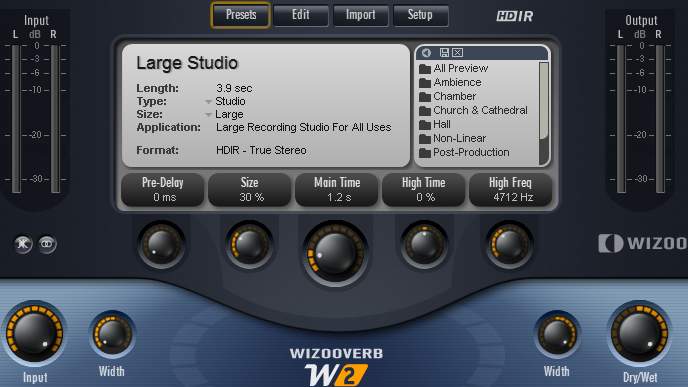
Now that our rhythm guitar 2 has passed through an amp head and a cabinet, we'll add some "air" with a reverb plugin so the sound doesn't feel too confined. I used the WizooVerb plugin, which hasn't been sold for a few years but still sounds great. You can still find it in the darker corners of the internet (I don't condone it, but do as you wish), or you can use other paid or free reverb plugins. They are easy to find, and I suggest a few on this page. I commonly use SIR Convolution, which works with impulses just like cabinet simulators. But instead of cabinet impulses, you use room impulses recorded in various locations (from bathrooms to cathedrals, concert halls, or rooms in a house).

Here are the settings used with the Wizoo WizooVerb plugin:

- I used the Large Studio preset (a large multi-purpose recording studio). I reduced its "size" to 30% to avoid making it sound like it was recorded in an enormous room. The reverb time is set to 1.2s, and I adjusted the "Width" parameters so the reverb spreads in stereo. However, since the track panning is set to 90% right, the reverb only spreads on the right side.

- The reverb amount is controlled with the "DryWet" knob. At 0%, you hear no reverb at all; at 100%, you only hear the reverb and no dry sound. For rhythm guitar 2, it's set to 25%.

- Using reverb on a guitar is common. The dosage is a matter of personal preference, but too much reverb pushes the instrument away and drowns it in the mix.
WizooVerb Plugin
WizooVerb Plugin

Equalization

Here is the sound of rhythm guitar 2 processed with an amp, a cabinet, and reverb (in that order) before equalization...


(mp3 file)


And after equalization


(mp3 file)

The sound of rhythm guitar 2 will then be sent to the Rhythm Guitar bus, where it will join rhythm guitar 1.

Now that the sound of rhythm guitar 2 is complete, it still needs to be sculpted to fit into the mix. For this track, I used Wave Arts' TrackPlug, an excellent paid EQ plugin. As an alternative, you can download Cockos ReaEQ, a free parametric equalizer that allows you to equalize the sound in nearly the same way, though it is slightly less comprehensive for certain adjustments.

Here are the settings used with the Wave Arts TrackPlug plugin:

- Unlike rhythm guitar 1, no brickwall was used here. Therefore, the low frequencies aren't cut as sharply.

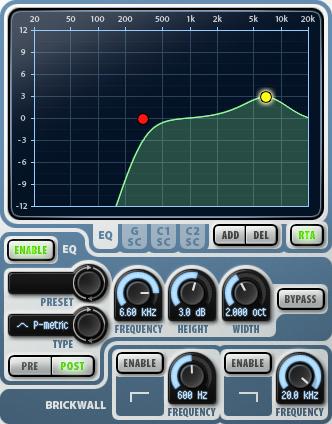
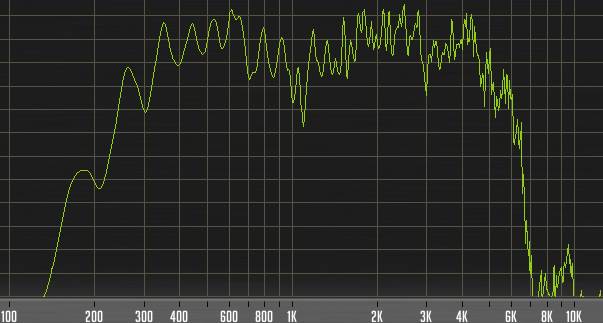
- I placed a HighPass band at 300 Hz (red dot) to begin rolling off low frequencies starting at this value. You can see in the frequency analyzer screenshot below that the volume drops quickly below this frequency and fades out completely around 140 Hz.

- I boosted 6.6 KHz by 3 dB to better bring out the guitar's brightness. A larger increase would have made the sound too harsh and aggressive.

- No compression is applied to this guitar for now. A slight boost will be added using a limiter on the Rhythm Guitar bus.
TrackPlug Plugin
TrackPlug Plugin
Rhythm guitar 2 frequencies
Mixing in practice : Preparing the session | Bass | Drums | Rhythm guitars | Lead guitars | Synths | Vocals | Mastering
Haut de page

RHYTHM GUITARS BUS

Here is the sound of the two rhythm guitars without the limiter...


(mp3 file)


And with the limiter


(mp3 file)

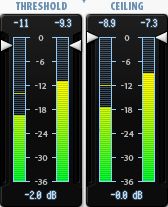
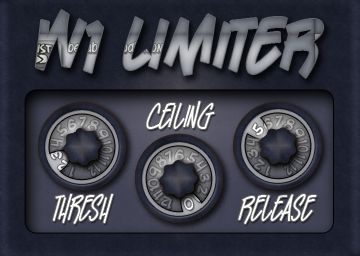
This stereo bus is where the signals from both rhythm guitar tracks meet. Here, I am using Wave Arts' FinalPlug, a paid brickwall limiter plugin used to boost the sound and make the guitars more present in the track. A brickwall limiter is a type of compressor that prevents the signal from exceeding a set level. If poorly adjusted (with too much compression), it can crush the sound and even cause distortion. Properly set, it simply adds more "punch" to the audio it is applied to. As an alternative, you can use George Yohng's W1 Limiter (shown here with the BetaBugsAudio interface), an excellent free limiter available for download here.

Here are the settings used with the Wave Arts FinalPlug plugin:

- "Threshold": -2 dB. The threshold is the level at which the compression is triggered to boost the signal. The -2 dB value chosen here is quite subtle, only boosting the signal by a maximum of 2 dB. The free Classic Master Limiter plugin offers only this single setting, allowing you to adjust the threshold between -20 and 0 dB.

- "Ceiling": 0 dB. The ceiling is the level that the sound cannot exceed. In this case, all sounds reaching within 2 dB of the maximum volume allowed by the bus are increased by 2 dB and cannot surpass this value. The 0 dB ceiling value actually corresponds to the volume of the bus (or track) where the plugin is placed. Here, the bus volume is set to -10 dB, so the actual threshold is -12 dB, and the actual ceiling is -10 dB.

- The rhythm guitar sound is now final for the mix. It will only be modified during the final mastering stage.
Finalplug Plugin
Finalplug Plugin
W1 Limiter Plugin
W1 Limiter Plugin
Mixing in practice : Preparing the session | Bass | Drums | Rhythm guitars | Lead guitars | Synths | Vocals | Mastering
Haut de page
Top of page


MESSAGES

(leave a message)

Messages page # 1 2 3 4 5 6 7 8 9 10 11 12 13 14 15 16 17 18 19 20 21 22 23 24 25 26 27 28 29 30 31 32 33 34 35


CelticBreizh
le 12/04/2010 à 22h00

Encore merci de votre réponse. Je me demande même si je ne vais pas craquer pour votre carte qui a plus de réglages en façade, laissant l'arrière aux Jacks et à l'alim.

* * * * * * * * * * * * * * * *

<em>Comme vous voulez, mais avez-vous vraiment besoin de 8 entrées ? Dont seulement 2 avec préampli (les deux à l'avant) ? À vous de voir,

Grebz</em>


CelticBreizh
le 12/04/2010 à 09h21

Bonjour,

J'envisage l'acquisition d'une nouvelle interface audio type EDIROL FA-66 et je voulais savoir ce que vous en pensiez étant donné que vous avez déjà une EDIROL FA-101, un modèle un peu semblable mis à part le nombre important d'entrées.

Ma carte Presonus me joue des tours mais je souhaiterais rester sur une connexion en firewire. Pouvez-vous me dire si c'est un bon choix ?

* * * * * * * * * * * * * * * *

<em>Bonjour Éric,

<a href="http://fr.audiofanzine.com/carte-son-externe/edirol/FA-66/avis/">Les avis sur Audiofanzine</a> sont tous très bons. Visiblement les utilisateurs sont satisfaits de leur achat. De mon côté, je suis également satisfait de ma FA-101 qui ne m'a jamais fait défaut, que j'enregistre seul chez moi en n'utilisant qu'une seule entrée, ou bien en enregistrant un groupe en live avec 8 entrées simultanées. Les préamplis de la carte ne sont pas extraordinaires, mais devraient suffire néanmoins. En cas de besoin, il sera toujours possible de leur adjoindre ultérieurement un préampli externe supplémentaire.

La connexion Firewire a l'avantage d'utiliser très peu de ressources processeur (moins qu'une connexion USB), ce qui permet de libérer ces ressources supplémentaires pour le séquenceur, d'être très stable et d'avoir une bande passante supérieure à l'USB 2.
Dans le cas de la musique, toutefois, cette dernière caractéristique n'a pas vraiment d'importance. C'est plus important dans le domaine de la vidéo.

Au niveau des défauts, la connexion Firewire nécessite l'utilisation d'une alimentation secteur lors d'une utilisation sur un portable. La prise mini-Firewire qu'on trouve sur les portables ne peut pas fournir d'alimentation électrique contrairement à l'USB. Donc, il faudra brancher l'interface sur le secteur, ce qui fait des branchements en plus. Mais pour une installation fixe, ce n'est pas trop gênant.

Les drivers de la FA-101 sont stables, ils existent en 32 et 64 bits et fonctionnent sous Windows XP, Vista et Seven. Il me semble que les drivers sont communs pour la FA-101 et la FA-66... en tout cas, les fichiers qui composent ces drivers, téléchargés sur <a href="http://www.rolandus.com/products/productdetails.php?ProductId=731">le site d'Edirol</a>, sont quasiment identiques à 2 ou 3 détails près. La FA-66 n'est de toute manière qu'une FA-101 allégée, elles doivent sortir du même moule !

Donc oui, je peux vous recommander cette interface audio. De toute façon, achetez-la et essayez-la, vous avez légalement une semaine pour vous rétracter auprès de votre vendeur.

Grebz
</em>


Jikoo
le 12/04/2010 à 01h42

Superbe page (simulateurs d'ampli) !
J'ai appris plein de choses. C'est vraiment très intéressant. Merci beaucoup et bonne continuation.

Jerry Coox - Musicien
(Facile à trouver sur le web !)

* * * * * * * * * * * * * * * *

<em>Merci à vous !

Je rajoute un lien vers <a href="http://www.myspace.com/jerrycoox" target="_blanck">votre MySpace</a>, j'ai écouté ce que vous faites, c'est vraiment très bien !

Grebz</em>


CelticBreizh
le 24/03/2010 à 20h06

Bonjour,

Merci encore de votre précédente réponse.
Pour information, voila ce que j'ai relevé sur mon portable ACER :
Avant tout, j'ai pensé à ce portable parce qu'il est silencieux. Je ne dispose pas d'une pièce dédiée et suis en fauteuil roulant. Ce n'est pas toujours simple pour tous les branchements. Dans la MAO, je cherche juste à mettre de la musique, piste à piste, derrière mes textes. Alors maintenant mon ordinateur portable, c'est :
Modèle Aspire type 5670 / 5673 WLMi
Processeur : Intel Core Duo T2400 (1.83 GHz, 667 MHz FSB, 2MB L2 cache)
En fait, c'est un Intel Centrino Duo destiné plus particulièrement aux portables.
L'écran est un 15.4 pouces WXGA. C'est un peu petit pour y caser le séquenceur, la table de mixage, les VST et VSTi etc... ça finit par être complètement brouillon. Je sais qu'il me faut un autre écran (d'ailleurs mon portable peut l'accepter). Le séquenceur d'un côté et de l'autre, le mix et tous le reste. Ce serait plus clair. J'envisage effectivement l'achat d'un 24 ou 26 pouces.
La vidéo, c'est bien sûr de l'intégré, ATI Mobility Radeon X 1600
Le disque dur : 120 GB SATA partitionné. J'ai un disque dur externe Western Digital Caviar d'1To acheté récemment.
La mémoire : 2 Go DDR2 (support dual channel).
C'est sans doute là que ça pêche le plus, avec 2 Go et mon processeur centrino, je vais vite atteindre les limites si j'utilise beaucoup de VST ou VSTi.
Un petit plus, j'ai une prise FireWire sur laquelle je branche ma carte son externe Presonus Fire Box.
Je n'ai pas encore de préampli mais j'envisage d'en acheter un. Un petit et modeste appareil, je n'ai ni les prétentions, ni les moyens d'un studio professionnel.
J'ai repéré chez Thomann en Allemagne un ART TUBE MP à 38€. Ce sera sans doute mieux que rien vu que je n'en utilisais pas avant. Ça me fait 2 alim de 48 Volts pour mon micro statique SAMSON.
Par contre, j'utilise un EDIROL PCR - A30 et là, j'ai sans doute encore mal choisi puisqu'apparemment il serait doté d'une Audio Interface, cette interface n'était sans doute pas nécessaire puisque j'avais déjà une carte son PRESONUS ???
Ce clavier se branche en USB mais est aussi doté d'un transfo, c'est peut-être plus stable, je ne sais pas.
Les infos relevées sur ce clavier : EDIROL PCR - A30 - ROLAND, 24 Bit 96 kHz Digital Audio, USB Audio Interface, Midi Key Board Controller.
Je sais que l'on peut contrôler certaines fonctions mais j'avoue que je ne l'utilise que comme un clavier midi. Je suis loin d'en tirer le maximum.
Un ami me l'avait conseillé mais maintenant, je ne sais pas si c'est un bon choix.
Et pour finir, je suis sous XP, et j'aimerais le rester.
C'est un portable que je veux remettre à plat en formatant et en le consacrant uniquement au son et rien d'autre.
La connexion Internet (pour les mises à jour windows) sera coupée pendant le travail sous Cubase, de même qu'Avast, mon antivirus. J'espère ainsi alléger le système. Il n'y aura même pas de messagerie.

Au fait, comment fait-on pour geler des pistes ?

Je suis preneur de tous conseils. D'avance merci.

CelticBreizh


CelticBreizh
le 24/03/2010 à 01h45

Bonjour,

Un excellent site qui permet de s'y retrouver facilement dans la MAO.

Avant de trouver des séquenceurs "non limités", j'avais investi dans bon nombre de matériels, tables de mixage, racks en tous genres dont compresseur, ampli casques, microverb Alesis etc... tout en analogique bien entendu. Certaines tables de mixage étaient dotées d'une alim phantom pour mon micro statique, d'où cet achat que je regrette maintenant compte tenu des possibilités des petites cartes son externes bien suffisantes à mon goût (ma presonus gère le 48V). Quand Cubase a pu gérer correctement l'audio et pas seulement le midi, j'ai soigneusement rangé tout ce matériel. Pour un temps, j'ai continué à me servir de ma table de mixage mais, l'encombrement fait que je vais me résoudre à utiliser le mix du séquenceur mais l'écran d'un portable n'est pas extensible et cela devient vite un casse tête d'ouvrir toutes ces fenêtres à l'écran et avoir constamment la main sur la souris. Mon portable n'a que 2 Go de ram, j'espère qu'il ne plantera pas durant les enregistrements que je faisais avant sur un fixe assemblé par mes soins. Pourquoi alors ce portable ? Moins de bruit, moins d'encombrement, moins de fils. Bien que vieux de 4 ans, son processeur est un double-coeur. Je vais lui adjoindre un disque dur externe et j'espère que cela suffira pour mes compos. Si vous pouviez me donner votre avis éclairé sur mon modeste matériel, merci d'avance.

En tous cas, bravo pour les sujets abordés, ça a le mérite d'être clair alors que d'autres auraient traité cela de façon ultra technique sans que je puisse m'y retrouver.

À bientôt. Éric

* * * * * * * * * * * * * * * *

<em>Bonjour Éric,

Tout d'abord merci de votre message sur mon site, ça fait plaisir de voir que je peux rendre service à quelqu'un. Si je fais cela, c'est parce que moi-même, j'ai pas mal galéré en me lançant dans la MAO voici quelques années et que j'ai eu du mal à m'y retrouver face à toutes ces notions déroutantes au départ. Je ne suis pas devenu un spécialiste pour autant, mais j'ai appris suffisamment pour essayer d'aider à mon tour, dans un langage que j'espère accessible au plus grand nombre, sans verser non plus dans l'abêtissement. Il faut parfois appeler un chat un chat (ou un compresseur un compresseur) pour éviter les dérives de langage qui perdent tout le monde... Bref.

En ce qui concerne votre matériel analogique, je ne sais pas s'il faut regretter de l'avoir acheté. J'imagine que financièrement, ça représente un investissement et qu'il est toujours dommage de s'apercevoir au bout de quelques temps qu'on n'a pas forcément fait le bon choix, mais malheureusement, dans les domaines "techniques" (informatique, musique, vidéo...), il sort constamment de nouveaux équipements qui supplantent les anciens et si on attend le bon moment... on ne se lance jamais ! Après, il y a l'encombrement qui peut également poser problème. Mais l'analogique a aussi des qualités : le son (évidemment, tout dépend du matériel), et la manipulation physique, plus naturelle à l'usage qu'une souris. Mais tout est question d'habitude.

Pour ce qui est de votre matériel actuel, un portable, vous avez vous-même parlé de ses limites : la taille de l'écran qui fait qu'on se sent vite à l'étroit, et le fait qu'il soit déjà un peu ancien (en termes informatiques bien entendu).
Pour l'écran, il vous est toujours possible de lui adjoindre un écran plat si vous disposez de la place suffisante, et du budget bien entendu. Un bon écran plat de bonne taille (disons 24 ou pourquoi pas, soyons fou, 26 pouces !) ajoutera beaucoup de confort pour un tarif à situer entre 200 et 300 euros selon la marque et la qualité attendue. Non négligeable, mais très confortable. Il est même possible de disposer ainsi d'un double écran, sur le portable et sur l'écran supplémentaire, à condition que la carte graphique du portable gère cette fonctionnalité, ce qui est bien souvent le cas.

Avoir un processeur dual-core est un avantage évident, tout dépend cependant du processeur en question. Certains dual-core un peu anciens ne sont pas très puissants, rien ne remplace un bon test par soi-même pour tester les limites de la machine.

J'utilise moi-même un portable de marque ASUS. Je l'ai acheté voici bientôt 3 ans, il a également un processeur dual-core à 2,5 GHz et 3 Go de mémoire. Fourni à l'origine avec Windows Vista, je l'ai remplacé récemment par Windows 7 en version 64 bits.

Voilà ce que je peux vous dire de mon expérience avec ce portable pour une utilisation musicale :
Déjà, je ne l'utilise pour la musique qu'en déplacement, puisque j'utilise normalement mon ordinateur de bureau, bien plus puissant. Ce que j'ai constaté, c'est qu'il réagit mieux lorsque j'utilise mon séquenceur Sonar en version 32 bits qu'en version 64 bits. j'ai installé les 2 versions et cette dernière est plus lourde semble-t-il. C'est en tout cas mon ressenti.
Hormis cela, aucun souci pour enregistrer. J'ai déjà enregistré plusieurs fois des concerts live, avec parfois jusqu'à 8 pistes simultanément, pour un enregistrement sans interruption pendant un peu moins de 3 heures. Ni le disque dur, ni le processeur (très peu sollicité par l'enregistrement) n'ont montré de signes de faiblesse. Le disque dur est pourtant un simple disque à 5400 tours par minute, donc pas franchement un foudre de guerre.
J'ai également enregistré une pièce de théâtre amateur en branchant simultanément une carte son USB et un caméscope FireWire et donc en enregistrant 2 pistes audio sur sonar, pendant que la vidéo s'enregistrait (sur le même disque dur) via un logiciel de montage. Toujours sans souci.

En fait, je trouve les limites de mon ordinateur portable lors de l'utilisation de plugins VST ou d'instruments VSTi. Là, je constate une nette différence avec mon PC de bureau. Mon processeur de portable sature bien plus vite. Mais j'avoue que j'utilise pas mal de plugins, parfois plusieurs dizaines sur un projet. La seule solution dans ce cas est de "geler" les pistes, de façon à libérer le processeur. Si vous utilisez peu de VST, il ne devrait pas y avoir de problème, mais dans le cas contraire, attendez-vous à rencontrer des ralentissements, voire des interruptions de lecture. Et lors d'enregistrements, désactivez les plugins inutiles pour soulager le processeur.

Quant aux 2 Go de mémoire, c'est peut-être un peu juste avec Windows Vista, mais cela devrait suffire pour XP ou Windows 7. Sachez qu'avec un 32 bits, Windows ne laisse pas plus de 3 à 3,5 Go de mémoire disponible pour l'utilisateur, et que chaque application ne peut disposer que de 2 Go au maximum. Le système lui-même va consommer une partie variable de la mémoire selon les applications et services installés.

C'est l'intérêt d'un système en 64 bits : à condition que le processeur le gère, un système 64 bits va pouvoir utiliser l'intégralité de la mémoire à sa disposition, et les applications 64 bits ne seront pas limitées non plus. Mais un logiciel 32 bits sur un système 64 bits sera toujours limité à 2 Go. Pour aller au-delà, il faut que le logiciel soit lui-même programmé en 64 bits.

Voilà ce que je peux vous dire. Musicalement vôtre,

Grebz</em>

* * * * * * * * * * * * * * * *

Merci d'avoir pris le temps de me répondre. ça me semble si clair maintenant. Un grand merci et encore bravo pour votre site.

Éric

Top of page